
Calendar software for the trades
for all trades
ready to go on day 1
save 4 to 8 hours a week
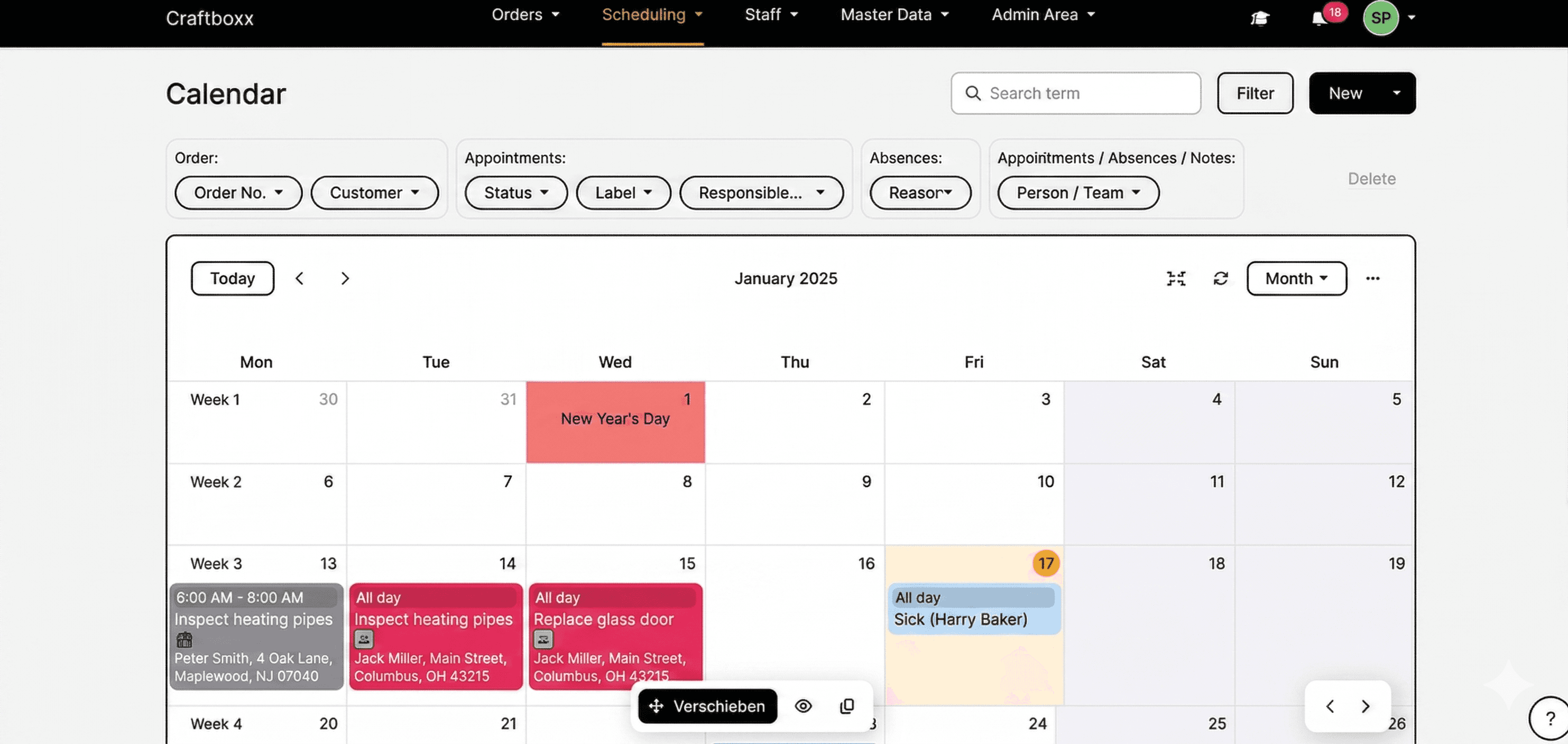
The calendar in Craftboxx works with our digital schedule board. The schedule board lets you keep an eye on your team, while the calendar focuses on your appointments. You can use both together or just pick the one that works best for you.
These customers trust us











Digital calendar for trades
Color-coded calendar
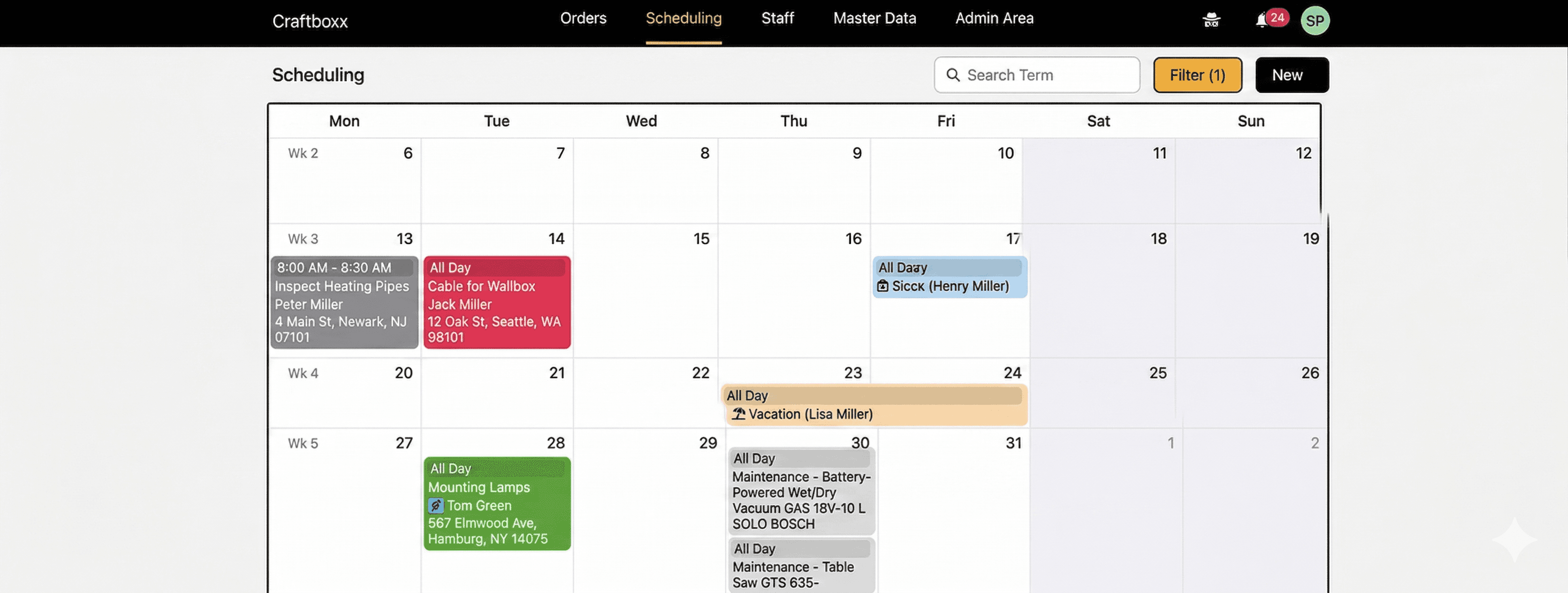
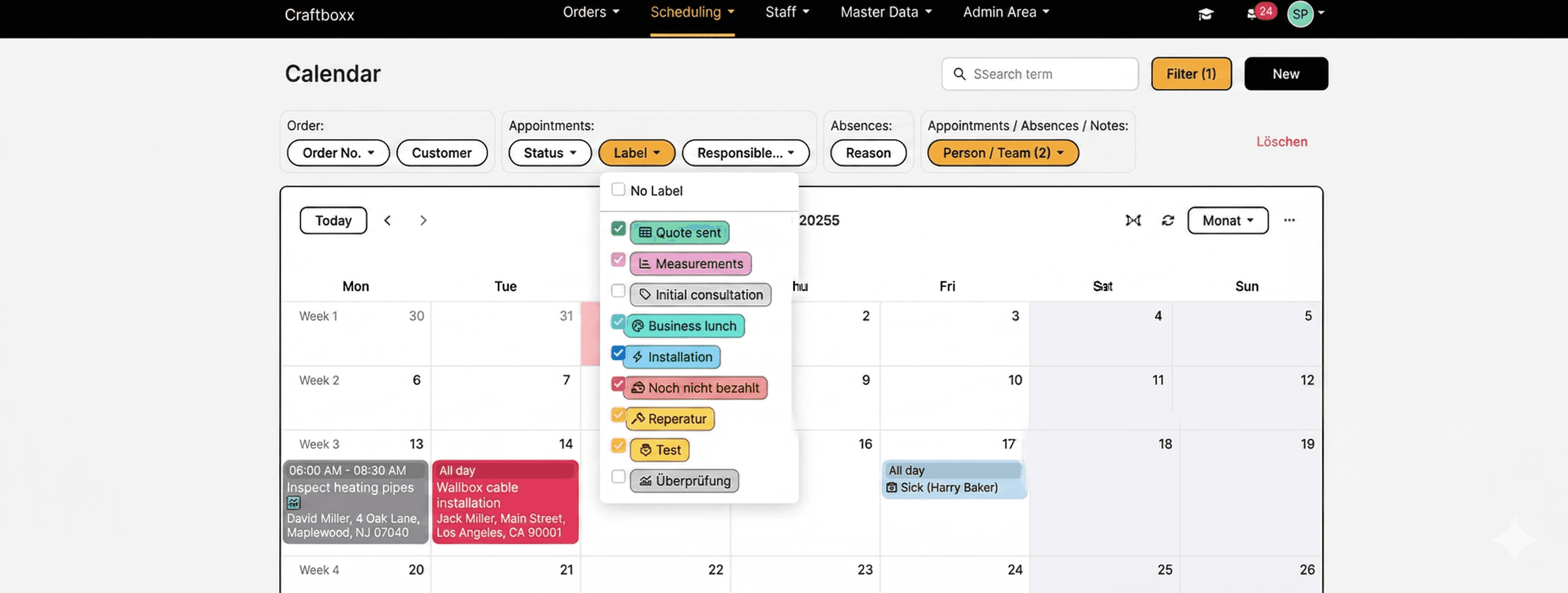
Appointments in the calendar are highlighted in different colors based on their status. This way, you don't just see every appointment at a glance, you also know exactly where you stand with all your tasks and projects.
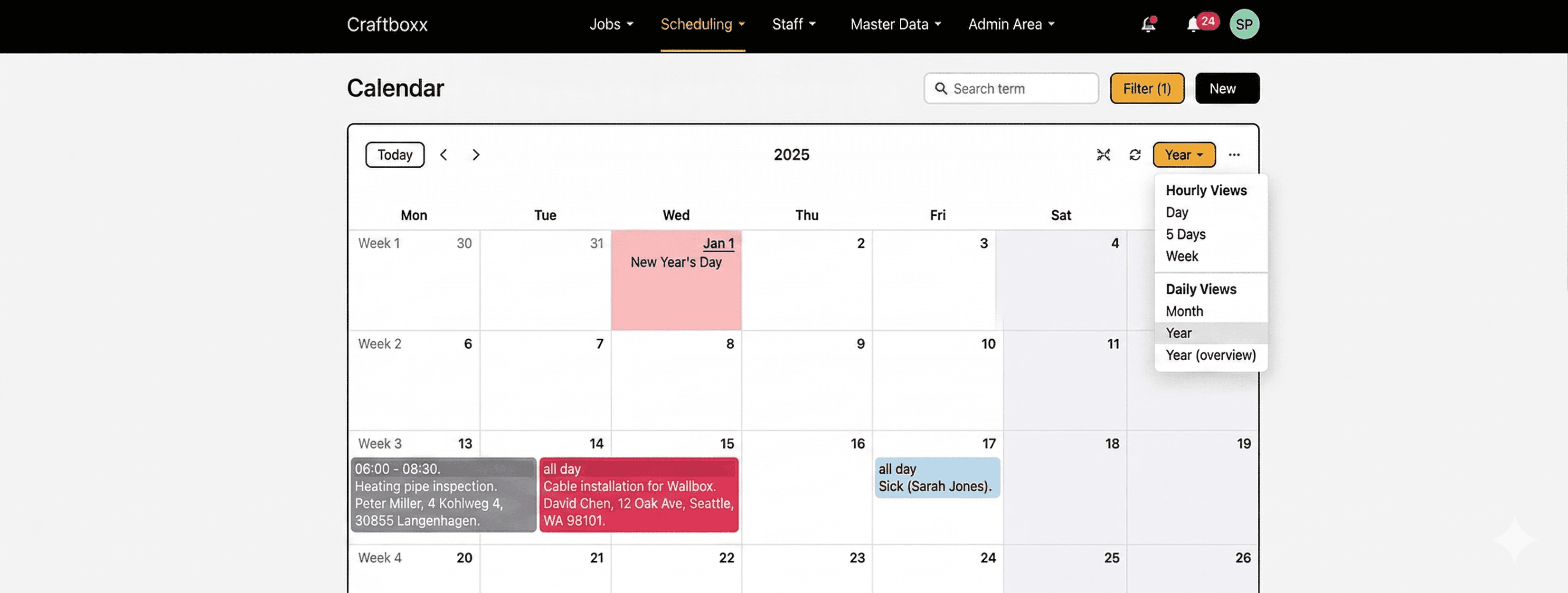
From hourly to yearly calendar views
Hourly and daily views help you keep an eye on everything. Choose from different overviews and pick the one that fits how your shop works. Click on an appointment to get details like the job site address and any attached documents.
Digital calendar with drag and drop
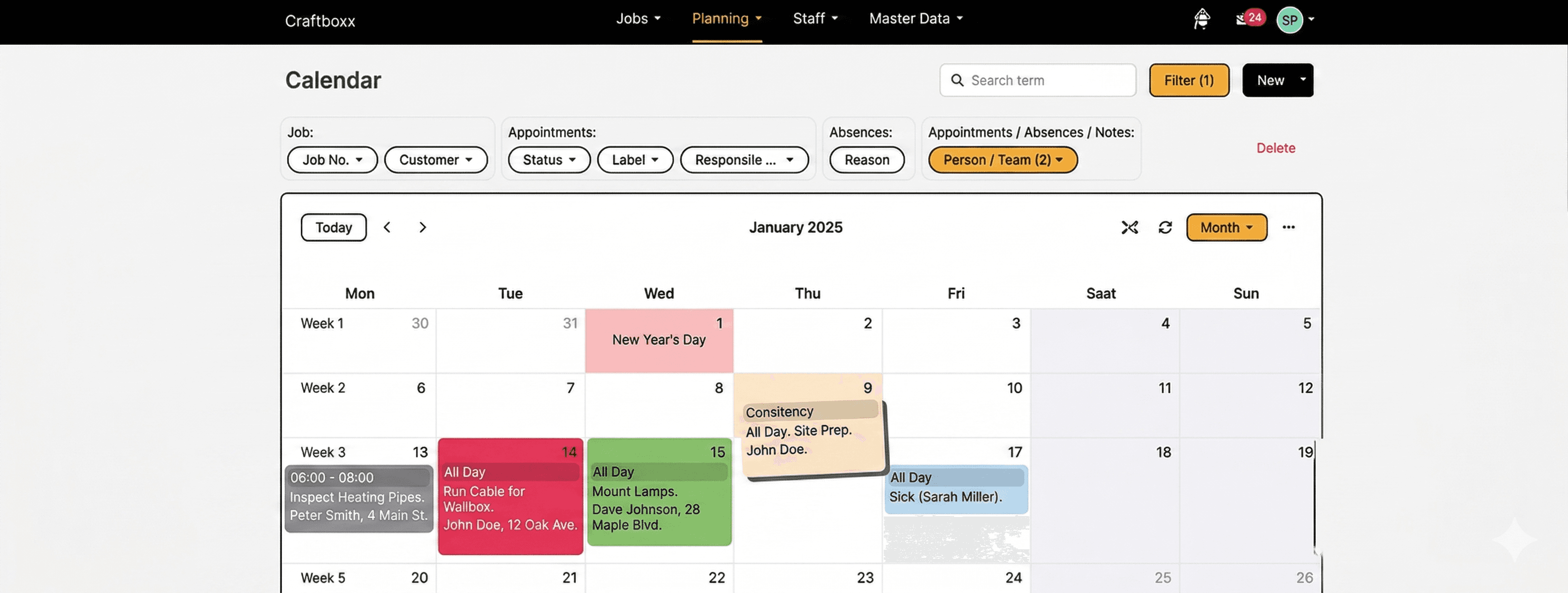
If a customer asks to move an appointment—it’s no problem. Or maybe a sick team member is coming back next week? You’ve got this. Use the drag and drop feature to move appointments into a different time slot easily.
Plenty of ways to filter your calendar
To get a better view, you can filter your calendar entries. For example, you can filter by team members, jobs or project status. This lets you show only the appointments that are currently in progress or already finished.
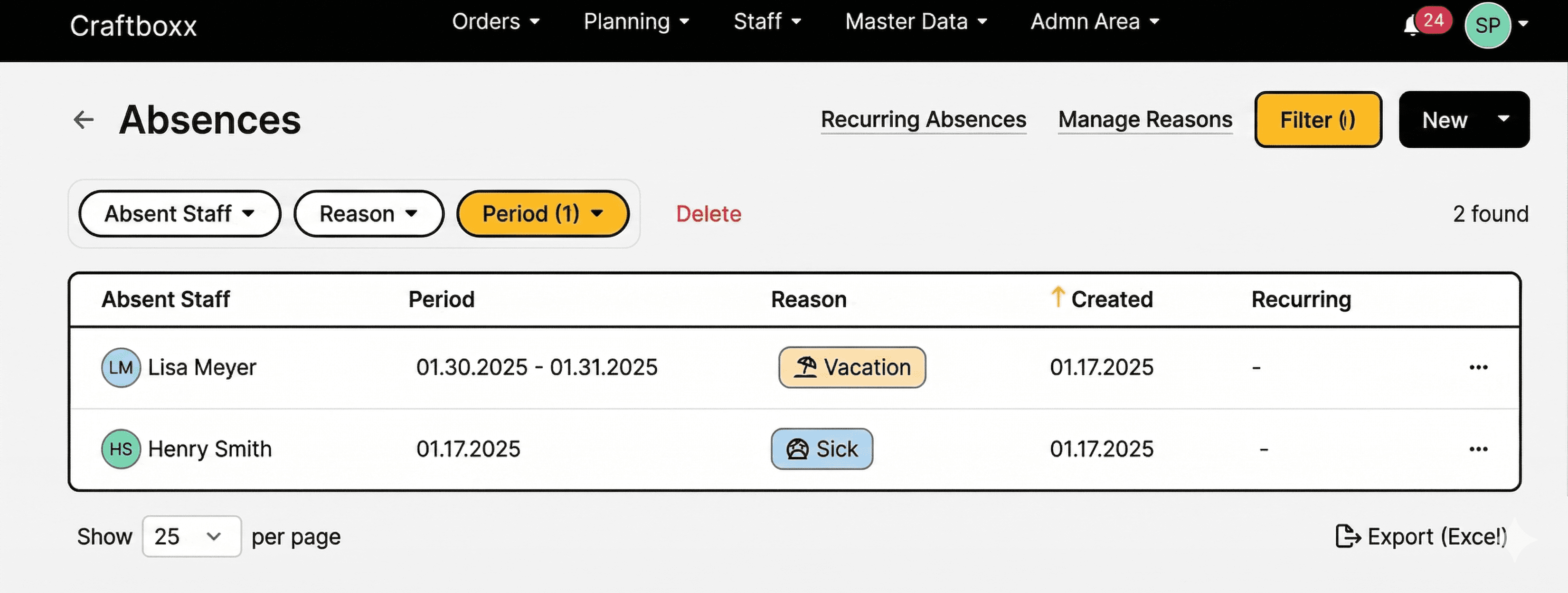
See time off in the calendar
Along with job times and appointments, you can see all the time off for your crew. Whether it’s vacation, sick leave or training—you’ll see who's out and why, all color-coded in the calendar.
Your trade with Craftboxx

Management
Track every job completely
Digital time tracking included
One tool for all locations
Finally, digital planning
Management
Track every job completely
Digital time tracking included
One tool for all locations
Finally, digital planning

In the office
Organize upcoming work better
Plan and document jobs
Manage time off more easily
Move your business forward digitally
Happier customers
In the office
Organize upcoming work better
Plan and document jobs
Manage time off more easily
Move your business forward digitally
Happier customers

On the job site
Easy documentation and sign-off on-site
Track work hours and time off
Well-planned work at last
On the job site
Easy documentation and sign-off on-site
Track work hours and time off
Well-planned work at last
How do customers like Craftboxx?
PF
Patrick Fialkowski
"A very attractive and user-friendly program for our employees, especially for the planners in the office. Clear order planning and much more. Excellent customer service."
SH
Sascha Hotz
"Perfect for owners of small craft businesses. Craftboxx makes our scheduling, organization, and documentation much easier. Everything is presented in a really simple and self-explanatory way. The pricing is absolutely fair."
RD
Robert Dörmer
"The response has been excellent. We have included Craftboxx in our digital package for tradespeople. The response has been excellent, and communication is absolutely outstanding. I can highly recommend Craftboxx!"
ZU
ZickZack UG&CoKG
"We are very satisfied and can only recommend this tool. We are very satisfied and have been using the tool for six months now. We plan all orders and document them with the corresponding customer signature. What's particularly great is that the app is intuitive to use. Any questions we had were answered immediately. We look forward to continuing this uncomplicated collaboration."
SKG
Firma SKG
We use the app in our 11-person company. As an assembly company, it's a great thing because the transmission works down to the minute. The app is clear, easy to use, and very functional. With planner access, new orders can be added or discussed on the phone at any time. The log can then be created once for the file and once for the customer. The best thing is the young company in the back office. They are willing to accept practical advice from the "front line" and are committed to further development and responding to the needs of practitioners. We are very satisfied and have already recommended the app several times." *** Translated with www.DeepL.com/Translator (free version) ***
SKR
SKR Fahrbahnmarkierung
Craftboxx is a wonderful tool for construction site planning. In addition to vehicles, employees, and tools, materials and material consumption can also be organized very easily. The support is also SUPER. If something needs to be done or a change makes sense, it is implemented quickly!
MP
Marco Papenberg
"We are completely satisfied with this app! We have been planning and implementing our activities with Craftboxx for about a year now. There is nothing to complain about. Thanks to this digital planning and evaluation, we have been able to save on a full-time employee. Kudos to the developers!"
SA
Schuster Aufzugsdienste
"Super useful program. Top-notch support and quick help at any time. Very efficient when it comes to organizing staff and appointments. Very easy to use and super simple and clear for employees and planners."
JS
Jeremia
SevenCable GmbHCraftboxx exceeded our expectations. We spent a long time searching for the right software to make work easier for our field and office staff. Craftboxx has even exceeded our expectations in this regard. From the planning and execution of projects and orders to their documentation and archiving, we believe this program is unbeatable. Craftboxx is designed to be extremely user-friendly thanks to its intuitive structure, and the introduction and integration of the system into our existing business went smoothly and without many questions from staff." *** Translated with www.DeepL.com/Translator (free version) ***
PF
Patrick Fialkowski
"A very attractive and user-friendly program for our employees, especially for the planners in the office. Clear order planning and much more. Excellent customer service."
SH
Sascha Hotz
"Perfect for owners of small craft businesses. Craftboxx makes our scheduling, organization, and documentation much easier. Everything is presented in a really simple and self-explanatory way. The pricing is absolutely fair."
RD
Robert Dörmer
"The response has been excellent. We have included Craftboxx in our digital package for tradespeople. The response has been excellent, and communication is absolutely outstanding. I can highly recommend Craftboxx!"
ZU
ZickZack UG&CoKG
"We are very satisfied and can only recommend this tool. We are very satisfied and have been using the tool for six months now. We plan all orders and document them with the corresponding customer signature. What's particularly great is that the app is intuitive to use. Any questions we had were answered immediately. We look forward to continuing this uncomplicated collaboration."
SKG
Firma SKG
We use the app in our 11-person company. As an assembly company, it's a great thing because the transmission works down to the minute. The app is clear, easy to use, and very functional. With planner access, new orders can be added or discussed on the phone at any time. The log can then be created once for the file and once for the customer. The best thing is the young company in the back office. They are willing to accept practical advice from the "front line" and are committed to further development and responding to the needs of practitioners. We are very satisfied and have already recommended the app several times." *** Translated with www.DeepL.com/Translator (free version) ***
SKR
SKR Fahrbahnmarkierung
Craftboxx is a wonderful tool for construction site planning. In addition to vehicles, employees, and tools, materials and material consumption can also be organized very easily. The support is also SUPER. If something needs to be done or a change makes sense, it is implemented quickly!
MP
Marco Papenberg
"We are completely satisfied with this app! We have been planning and implementing our activities with Craftboxx for about a year now. There is nothing to complain about. Thanks to this digital planning and evaluation, we have been able to save on a full-time employee. Kudos to the developers!"
SA
Schuster Aufzugsdienste
"Super useful program. Top-notch support and quick help at any time. Very efficient when it comes to organizing staff and appointments. Very easy to use and super simple and clear for employees and planners."
JS
Jeremia
SevenCable GmbHCraftboxx exceeded our expectations. We spent a long time searching for the right software to make work easier for our field and office staff. Craftboxx has even exceeded our expectations in this regard. From the planning and execution of projects and orders to their documentation and archiving, we believe this program is unbeatable. Craftboxx is designed to be extremely user-friendly thanks to its intuitive structure, and the introduction and integration of the system into our existing business went smoothly and without many questions from staff." *** Translated with www.DeepL.com/Translator (free version) ***
PF
Patrick Fialkowski
"A very attractive and user-friendly program for our employees, especially for the planners in the office. Clear order planning and much more. Excellent customer service."
SH
Sascha Hotz
"Perfect for owners of small craft businesses. Craftboxx makes our scheduling, organization, and documentation much easier. Everything is presented in a really simple and self-explanatory way. The pricing is absolutely fair."
RD
Robert Dörmer
"The response has been excellent. We have included Craftboxx in our digital package for tradespeople. The response has been excellent, and communication is absolutely outstanding. I can highly recommend Craftboxx!"
ZU
ZickZack UG&CoKG
"We are very satisfied and can only recommend this tool. We are very satisfied and have been using the tool for six months now. We plan all orders and document them with the corresponding customer signature. What's particularly great is that the app is intuitive to use. Any questions we had were answered immediately. We look forward to continuing this uncomplicated collaboration."
SKG
Firma SKG
We use the app in our 11-person company. As an assembly company, it's a great thing because the transmission works down to the minute. The app is clear, easy to use, and very functional. With planner access, new orders can be added or discussed on the phone at any time. The log can then be created once for the file and once for the customer. The best thing is the young company in the back office. They are willing to accept practical advice from the "front line" and are committed to further development and responding to the needs of practitioners. We are very satisfied and have already recommended the app several times." *** Translated with www.DeepL.com/Translator (free version) ***
SKR
SKR Fahrbahnmarkierung
Craftboxx is a wonderful tool for construction site planning. In addition to vehicles, employees, and tools, materials and material consumption can also be organized very easily. The support is also SUPER. If something needs to be done or a change makes sense, it is implemented quickly!
MP
Marco Papenberg
"We are completely satisfied with this app! We have been planning and implementing our activities with Craftboxx for about a year now. There is nothing to complain about. Thanks to this digital planning and evaluation, we have been able to save on a full-time employee. Kudos to the developers!"
SA
Schuster Aufzugsdienste
"Super useful program. Top-notch support and quick help at any time. Very efficient when it comes to organizing staff and appointments. Very easy to use and super simple and clear for employees and planners."
JS
Jeremia
SevenCable GmbHCraftboxx exceeded our expectations. We spent a long time searching for the right software to make work easier for our field and office staff. Craftboxx has even exceeded our expectations in this regard. From the planning and execution of projects and orders to their documentation and archiving, we believe this program is unbeatable. Craftboxx is designed to be extremely user-friendly thanks to its intuitive structure, and the introduction and integration of the system into our existing business went smoothly and without many questions from staff." *** Translated with www.DeepL.com/Translator (free version) ***
PF
Patrick Fialkowski
"A very attractive and user-friendly program for our employees, especially for the planners in the office. Clear order planning and much more. Excellent customer service."
SH
Sascha Hotz
"Perfect for owners of small craft businesses. Craftboxx makes our scheduling, organization, and documentation much easier. Everything is presented in a really simple and self-explanatory way. The pricing is absolutely fair."
RD
Robert Dörmer
"The response has been excellent. We have included Craftboxx in our digital package for tradespeople. The response has been excellent, and communication is absolutely outstanding. I can highly recommend Craftboxx!"
ZU
ZickZack UG&CoKG
"We are very satisfied and can only recommend this tool. We are very satisfied and have been using the tool for six months now. We plan all orders and document them with the corresponding customer signature. What's particularly great is that the app is intuitive to use. Any questions we had were answered immediately. We look forward to continuing this uncomplicated collaboration."
SKG
Firma SKG
We use the app in our 11-person company. As an assembly company, it's a great thing because the transmission works down to the minute. The app is clear, easy to use, and very functional. With planner access, new orders can be added or discussed on the phone at any time. The log can then be created once for the file and once for the customer. The best thing is the young company in the back office. They are willing to accept practical advice from the "front line" and are committed to further development and responding to the needs of practitioners. We are very satisfied and have already recommended the app several times." *** Translated with www.DeepL.com/Translator (free version) ***
SKR
SKR Fahrbahnmarkierung
Craftboxx is a wonderful tool for construction site planning. In addition to vehicles, employees, and tools, materials and material consumption can also be organized very easily. The support is also SUPER. If something needs to be done or a change makes sense, it is implemented quickly!
MP
Marco Papenberg
"We are completely satisfied with this app! We have been planning and implementing our activities with Craftboxx for about a year now. There is nothing to complain about. Thanks to this digital planning and evaluation, we have been able to save on a full-time employee. Kudos to the developers!"
SA
Schuster Aufzugsdienste
"Super useful program. Top-notch support and quick help at any time. Very efficient when it comes to organizing staff and appointments. Very easy to use and super simple and clear for employees and planners."
JS
Jeremia
SevenCable GmbHCraftboxx exceeded our expectations. We spent a long time searching for the right software to make work easier for our field and office staff. Craftboxx has even exceeded our expectations in this regard. From the planning and execution of projects and orders to their documentation and archiving, we believe this program is unbeatable. Craftboxx is designed to be extremely user-friendly thanks to its intuitive structure, and the introduction and integration of the system into our existing business went smoothly and without many questions from staff." *** Translated with www.DeepL.com/Translator (free version) ***
PF
Patrick Fialkowski
"A very attractive and user-friendly program for our employees, especially for the planners in the office. Clear order planning and much more. Excellent customer service."
SH
Sascha Hotz
"Perfect for owners of small craft businesses. Craftboxx makes our scheduling, organization, and documentation much easier. Everything is presented in a really simple and self-explanatory way. The pricing is absolutely fair."
RD
Robert Dörmer
"The response has been excellent. We have included Craftboxx in our digital package for tradespeople. The response has been excellent, and communication is absolutely outstanding. I can highly recommend Craftboxx!"
ZU
ZickZack UG&CoKG
"We are very satisfied and can only recommend this tool. We are very satisfied and have been using the tool for six months now. We plan all orders and document them with the corresponding customer signature. What's particularly great is that the app is intuitive to use. Any questions we had were answered immediately. We look forward to continuing this uncomplicated collaboration."
SKG
Firma SKG
We use the app in our 11-person company. As an assembly company, it's a great thing because the transmission works down to the minute. The app is clear, easy to use, and very functional. With planner access, new orders can be added or discussed on the phone at any time. The log can then be created once for the file and once for the customer. The best thing is the young company in the back office. They are willing to accept practical advice from the "front line" and are committed to further development and responding to the needs of practitioners. We are very satisfied and have already recommended the app several times." *** Translated with www.DeepL.com/Translator (free version) ***
SKR
SKR Fahrbahnmarkierung
Craftboxx is a wonderful tool for construction site planning. In addition to vehicles, employees, and tools, materials and material consumption can also be organized very easily. The support is also SUPER. If something needs to be done or a change makes sense, it is implemented quickly!
MP
Marco Papenberg
"We are completely satisfied with this app! We have been planning and implementing our activities with Craftboxx for about a year now. There is nothing to complain about. Thanks to this digital planning and evaluation, we have been able to save on a full-time employee. Kudos to the developers!"
SA
Schuster Aufzugsdienste
"Super useful program. Top-notch support and quick help at any time. Very efficient when it comes to organizing staff and appointments. Very easy to use and super simple and clear for employees and planners."
JS
Jeremia
SevenCable GmbHCraftboxx exceeded our expectations. We spent a long time searching for the right software to make work easier for our field and office staff. Craftboxx has even exceeded our expectations in this regard. From the planning and execution of projects and orders to their documentation and archiving, we believe this program is unbeatable. Craftboxx is designed to be extremely user-friendly thanks to its intuitive structure, and the introduction and integration of the system into our existing business went smoothly and without many questions from staff." *** Translated with www.DeepL.com/Translator (free version) ***
PF
Patrick Fialkowski
"A very attractive and user-friendly program for our employees, especially for the planners in the office. Clear order planning and much more. Excellent customer service."
SH
Sascha Hotz
"Perfect for owners of small craft businesses. Craftboxx makes our scheduling, organization, and documentation much easier. Everything is presented in a really simple and self-explanatory way. The pricing is absolutely fair."
RD
Robert Dörmer
"The response has been excellent. We have included Craftboxx in our digital package for tradespeople. The response has been excellent, and communication is absolutely outstanding. I can highly recommend Craftboxx!"
ZU
ZickZack UG&CoKG
"We are very satisfied and can only recommend this tool. We are very satisfied and have been using the tool for six months now. We plan all orders and document them with the corresponding customer signature. What's particularly great is that the app is intuitive to use. Any questions we had were answered immediately. We look forward to continuing this uncomplicated collaboration."
SKG
Firma SKG
We use the app in our 11-person company. As an assembly company, it's a great thing because the transmission works down to the minute. The app is clear, easy to use, and very functional. With planner access, new orders can be added or discussed on the phone at any time. The log can then be created once for the file and once for the customer. The best thing is the young company in the back office. They are willing to accept practical advice from the "front line" and are committed to further development and responding to the needs of practitioners. We are very satisfied and have already recommended the app several times." *** Translated with www.DeepL.com/Translator (free version) ***
SKR
SKR Fahrbahnmarkierung
Craftboxx is a wonderful tool for construction site planning. In addition to vehicles, employees, and tools, materials and material consumption can also be organized very easily. The support is also SUPER. If something needs to be done or a change makes sense, it is implemented quickly!
MP
Marco Papenberg
"We are completely satisfied with this app! We have been planning and implementing our activities with Craftboxx for about a year now. There is nothing to complain about. Thanks to this digital planning and evaluation, we have been able to save on a full-time employee. Kudos to the developers!"
SA
Schuster Aufzugsdienste
"Super useful program. Top-notch support and quick help at any time. Very efficient when it comes to organizing staff and appointments. Very easy to use and super simple and clear for employees and planners."
JS
Jeremia
SevenCable GmbHCraftboxx exceeded our expectations. We spent a long time searching for the right software to make work easier for our field and office staff. Craftboxx has even exceeded our expectations in this regard. From the planning and execution of projects and orders to their documentation and archiving, we believe this program is unbeatable. Craftboxx is designed to be extremely user-friendly thanks to its intuitive structure, and the introduction and integration of the system into our existing business went smoothly and without many questions from staff." *** Translated with www.DeepL.com/Translator (free version) ***
PF
Patrick Fialkowski
"A very attractive and user-friendly program for our employees, especially for the planners in the office. Clear order planning and much more. Excellent customer service."
SH
Sascha Hotz
"Perfect for owners of small craft businesses. Craftboxx makes our scheduling, organization, and documentation much easier. Everything is presented in a really simple and self-explanatory way. The pricing is absolutely fair."
RD
Robert Dörmer
"The response has been excellent. We have included Craftboxx in our digital package for tradespeople. The response has been excellent, and communication is absolutely outstanding. I can highly recommend Craftboxx!"
ZU
ZickZack UG&CoKG
"We are very satisfied and can only recommend this tool. We are very satisfied and have been using the tool for six months now. We plan all orders and document them with the corresponding customer signature. What's particularly great is that the app is intuitive to use. Any questions we had were answered immediately. We look forward to continuing this uncomplicated collaboration."
SKG
Firma SKG
We use the app in our 11-person company. As an assembly company, it's a great thing because the transmission works down to the minute. The app is clear, easy to use, and very functional. With planner access, new orders can be added or discussed on the phone at any time. The log can then be created once for the file and once for the customer. The best thing is the young company in the back office. They are willing to accept practical advice from the "front line" and are committed to further development and responding to the needs of practitioners. We are very satisfied and have already recommended the app several times." *** Translated with www.DeepL.com/Translator (free version) ***
SKR
SKR Fahrbahnmarkierung
Craftboxx is a wonderful tool for construction site planning. In addition to vehicles, employees, and tools, materials and material consumption can also be organized very easily. The support is also SUPER. If something needs to be done or a change makes sense, it is implemented quickly!
MP
Marco Papenberg
"We are completely satisfied with this app! We have been planning and implementing our activities with Craftboxx for about a year now. There is nothing to complain about. Thanks to this digital planning and evaluation, we have been able to save on a full-time employee. Kudos to the developers!"
SA
Schuster Aufzugsdienste
"Super useful program. Top-notch support and quick help at any time. Very efficient when it comes to organizing staff and appointments. Very easy to use and super simple and clear for employees and planners."
JS
Jeremia
SevenCable GmbHCraftboxx exceeded our expectations. We spent a long time searching for the right software to make work easier for our field and office staff. Craftboxx has even exceeded our expectations in this regard. From the planning and execution of projects and orders to their documentation and archiving, we believe this program is unbeatable. Craftboxx is designed to be extremely user-friendly thanks to its intuitive structure, and the introduction and integration of the system into our existing business went smoothly and without many questions from staff." *** Translated with www.DeepL.com/Translator (free version) ***
PF
Patrick Fialkowski
"A very attractive and user-friendly program for our employees, especially for the planners in the office. Clear order planning and much more. Excellent customer service."
SH
Sascha Hotz
"Perfect for owners of small craft businesses. Craftboxx makes our scheduling, organization, and documentation much easier. Everything is presented in a really simple and self-explanatory way. The pricing is absolutely fair."
RD
Robert Dörmer
"The response has been excellent. We have included Craftboxx in our digital package for tradespeople. The response has been excellent, and communication is absolutely outstanding. I can highly recommend Craftboxx!"
ZU
ZickZack UG&CoKG
"We are very satisfied and can only recommend this tool. We are very satisfied and have been using the tool for six months now. We plan all orders and document them with the corresponding customer signature. What's particularly great is that the app is intuitive to use. Any questions we had were answered immediately. We look forward to continuing this uncomplicated collaboration."
SKG
Firma SKG
We use the app in our 11-person company. As an assembly company, it's a great thing because the transmission works down to the minute. The app is clear, easy to use, and very functional. With planner access, new orders can be added or discussed on the phone at any time. The log can then be created once for the file and once for the customer. The best thing is the young company in the back office. They are willing to accept practical advice from the "front line" and are committed to further development and responding to the needs of practitioners. We are very satisfied and have already recommended the app several times." *** Translated with www.DeepL.com/Translator (free version) ***
SKR
SKR Fahrbahnmarkierung
Craftboxx is a wonderful tool for construction site planning. In addition to vehicles, employees, and tools, materials and material consumption can also be organized very easily. The support is also SUPER. If something needs to be done or a change makes sense, it is implemented quickly!
MP
Marco Papenberg
"We are completely satisfied with this app! We have been planning and implementing our activities with Craftboxx for about a year now. There is nothing to complain about. Thanks to this digital planning and evaluation, we have been able to save on a full-time employee. Kudos to the developers!"
SA
Schuster Aufzugsdienste
"Super useful program. Top-notch support and quick help at any time. Very efficient when it comes to organizing staff and appointments. Very easy to use and super simple and clear for employees and planners."
JS
Jeremia
SevenCable GmbHCraftboxx exceeded our expectations. We spent a long time searching for the right software to make work easier for our field and office staff. Craftboxx has even exceeded our expectations in this regard. From the planning and execution of projects and orders to their documentation and archiving, we believe this program is unbeatable. Craftboxx is designed to be extremely user-friendly thanks to its intuitive structure, and the introduction and integration of the system into our existing business went smoothly and without many questions from staff." *** Translated with www.DeepL.com/Translator (free version) ***
PF
Patrick Fialkowski
"A very attractive and user-friendly program for our employees, especially for the planners in the office. Clear order planning and much more. Excellent customer service."
SH
Sascha Hotz
"Perfect for owners of small craft businesses. Craftboxx makes our scheduling, organization, and documentation much easier. Everything is presented in a really simple and self-explanatory way. The pricing is absolutely fair."
RD
Robert Dörmer
"The response has been excellent. We have included Craftboxx in our digital package for tradespeople. The response has been excellent, and communication is absolutely outstanding. I can highly recommend Craftboxx!"
ZU
ZickZack UG&CoKG
"We are very satisfied and can only recommend this tool. We are very satisfied and have been using the tool for six months now. We plan all orders and document them with the corresponding customer signature. What's particularly great is that the app is intuitive to use. Any questions we had were answered immediately. We look forward to continuing this uncomplicated collaboration."
SKG
Firma SKG
We use the app in our 11-person company. As an assembly company, it's a great thing because the transmission works down to the minute. The app is clear, easy to use, and very functional. With planner access, new orders can be added or discussed on the phone at any time. The log can then be created once for the file and once for the customer. The best thing is the young company in the back office. They are willing to accept practical advice from the "front line" and are committed to further development and responding to the needs of practitioners. We are very satisfied and have already recommended the app several times." *** Translated with www.DeepL.com/Translator (free version) ***
SKR
SKR Fahrbahnmarkierung
Craftboxx is a wonderful tool for construction site planning. In addition to vehicles, employees, and tools, materials and material consumption can also be organized very easily. The support is also SUPER. If something needs to be done or a change makes sense, it is implemented quickly!
MP
Marco Papenberg
"We are completely satisfied with this app! We have been planning and implementing our activities with Craftboxx for about a year now. There is nothing to complain about. Thanks to this digital planning and evaluation, we have been able to save on a full-time employee. Kudos to the developers!"
SA
Schuster Aufzugsdienste
"Super useful program. Top-notch support and quick help at any time. Very efficient when it comes to organizing staff and appointments. Very easy to use and super simple and clear for employees and planners."
JS
Jeremia
SevenCable GmbHCraftboxx exceeded our expectations. We spent a long time searching for the right software to make work easier for our field and office staff. Craftboxx has even exceeded our expectations in this regard. From the planning and execution of projects and orders to their documentation and archiving, we believe this program is unbeatable. Craftboxx is designed to be extremely user-friendly thanks to its intuitive structure, and the introduction and integration of the system into our existing business went smoothly and without many questions from staff." *** Translated with www.DeepL.com/Translator (free version) ***
PF
Patrick Fialkowski
"A very attractive and user-friendly program for our employees, especially for the planners in the office. Clear order planning and much more. Excellent customer service."
SH
Sascha Hotz
"Perfect for owners of small craft businesses. Craftboxx makes our scheduling, organization, and documentation much easier. Everything is presented in a really simple and self-explanatory way. The pricing is absolutely fair."
RD
Robert Dörmer
"The response has been excellent. We have included Craftboxx in our digital package for tradespeople. The response has been excellent, and communication is absolutely outstanding. I can highly recommend Craftboxx!"
ZU
ZickZack UG&CoKG
"We are very satisfied and can only recommend this tool. We are very satisfied and have been using the tool for six months now. We plan all orders and document them with the corresponding customer signature. What's particularly great is that the app is intuitive to use. Any questions we had were answered immediately. We look forward to continuing this uncomplicated collaboration."
SKG
Firma SKG
We use the app in our 11-person company. As an assembly company, it's a great thing because the transmission works down to the minute. The app is clear, easy to use, and very functional. With planner access, new orders can be added or discussed on the phone at any time. The log can then be created once for the file and once for the customer. The best thing is the young company in the back office. They are willing to accept practical advice from the "front line" and are committed to further development and responding to the needs of practitioners. We are very satisfied and have already recommended the app several times." *** Translated with www.DeepL.com/Translator (free version) ***
SKR
SKR Fahrbahnmarkierung
Craftboxx is a wonderful tool for construction site planning. In addition to vehicles, employees, and tools, materials and material consumption can also be organized very easily. The support is also SUPER. If something needs to be done or a change makes sense, it is implemented quickly!
MP
Marco Papenberg
"We are completely satisfied with this app! We have been planning and implementing our activities with Craftboxx for about a year now. There is nothing to complain about. Thanks to this digital planning and evaluation, we have been able to save on a full-time employee. Kudos to the developers!"
SA
Schuster Aufzugsdienste
"Super useful program. Top-notch support and quick help at any time. Very efficient when it comes to organizing staff and appointments. Very easy to use and super simple and clear for employees and planners."
JS
Jeremia
SevenCable GmbHCraftboxx exceeded our expectations. We spent a long time searching for the right software to make work easier for our field and office staff. Craftboxx has even exceeded our expectations in this regard. From the planning and execution of projects and orders to their documentation and archiving, we believe this program is unbeatable. Craftboxx is designed to be extremely user-friendly thanks to its intuitive structure, and the introduction and integration of the system into our existing business went smoothly and without many questions from staff." *** Translated with www.DeepL.com/Translator (free version) ***
PF
Patrick Fialkowski
"A very attractive and user-friendly program for our employees, especially for the planners in the office. Clear order planning and much more. Excellent customer service."
SH
Sascha Hotz
"Perfect for owners of small craft businesses. Craftboxx makes our scheduling, organization, and documentation much easier. Everything is presented in a really simple and self-explanatory way. The pricing is absolutely fair."
RD
Robert Dörmer
"The response has been excellent. We have included Craftboxx in our digital package for tradespeople. The response has been excellent, and communication is absolutely outstanding. I can highly recommend Craftboxx!"
ZU
ZickZack UG&CoKG
"We are very satisfied and can only recommend this tool. We are very satisfied and have been using the tool for six months now. We plan all orders and document them with the corresponding customer signature. What's particularly great is that the app is intuitive to use. Any questions we had were answered immediately. We look forward to continuing this uncomplicated collaboration."
SKG
Firma SKG
We use the app in our 11-person company. As an assembly company, it's a great thing because the transmission works down to the minute. The app is clear, easy to use, and very functional. With planner access, new orders can be added or discussed on the phone at any time. The log can then be created once for the file and once for the customer. The best thing is the young company in the back office. They are willing to accept practical advice from the "front line" and are committed to further development and responding to the needs of practitioners. We are very satisfied and have already recommended the app several times." *** Translated with www.DeepL.com/Translator (free version) ***
SKR
SKR Fahrbahnmarkierung
Craftboxx is a wonderful tool for construction site planning. In addition to vehicles, employees, and tools, materials and material consumption can also be organized very easily. The support is also SUPER. If something needs to be done or a change makes sense, it is implemented quickly!
MP
Marco Papenberg
"We are completely satisfied with this app! We have been planning and implementing our activities with Craftboxx for about a year now. There is nothing to complain about. Thanks to this digital planning and evaluation, we have been able to save on a full-time employee. Kudos to the developers!"
SA
Schuster Aufzugsdienste
"Super useful program. Top-notch support and quick help at any time. Very efficient when it comes to organizing staff and appointments. Very easy to use and super simple and clear for employees and planners."
JS
Jeremia
SevenCable GmbHCraftboxx exceeded our expectations. We spent a long time searching for the right software to make work easier for our field and office staff. Craftboxx has even exceeded our expectations in this regard. From the planning and execution of projects and orders to their documentation and archiving, we believe this program is unbeatable. Craftboxx is designed to be extremely user-friendly thanks to its intuitive structure, and the introduction and integration of the system into our existing business went smoothly and without many questions from staff." *** Translated with www.DeepL.com/Translator (free version) ***
PF
Patrick Fialkowski
"A very attractive and user-friendly program for our employees, especially for the planners in the office. Clear order planning and much more. Excellent customer service."
SH
Sascha Hotz
"Perfect for owners of small craft businesses. Craftboxx makes our scheduling, organization, and documentation much easier. Everything is presented in a really simple and self-explanatory way. The pricing is absolutely fair."
RD
Robert Dörmer
"The response has been excellent. We have included Craftboxx in our digital package for tradespeople. The response has been excellent, and communication is absolutely outstanding. I can highly recommend Craftboxx!"
ZU
ZickZack UG&CoKG
"We are very satisfied and can only recommend this tool. We are very satisfied and have been using the tool for six months now. We plan all orders and document them with the corresponding customer signature. What's particularly great is that the app is intuitive to use. Any questions we had were answered immediately. We look forward to continuing this uncomplicated collaboration."
SKG
Firma SKG
We use the app in our 11-person company. As an assembly company, it's a great thing because the transmission works down to the minute. The app is clear, easy to use, and very functional. With planner access, new orders can be added or discussed on the phone at any time. The log can then be created once for the file and once for the customer. The best thing is the young company in the back office. They are willing to accept practical advice from the "front line" and are committed to further development and responding to the needs of practitioners. We are very satisfied and have already recommended the app several times." *** Translated with www.DeepL.com/Translator (free version) ***
SKR
SKR Fahrbahnmarkierung
Craftboxx is a wonderful tool for construction site planning. In addition to vehicles, employees, and tools, materials and material consumption can also be organized very easily. The support is also SUPER. If something needs to be done or a change makes sense, it is implemented quickly!
MP
Marco Papenberg
"We are completely satisfied with this app! We have been planning and implementing our activities with Craftboxx for about a year now. There is nothing to complain about. Thanks to this digital planning and evaluation, we have been able to save on a full-time employee. Kudos to the developers!"
SA
Schuster Aufzugsdienste
"Super useful program. Top-notch support and quick help at any time. Very efficient when it comes to organizing staff and appointments. Very easy to use and super simple and clear for employees and planners."
JS
Jeremia
SevenCable GmbHCraftboxx exceeded our expectations. We spent a long time searching for the right software to make work easier for our field and office staff. Craftboxx has even exceeded our expectations in this regard. From the planning and execution of projects and orders to their documentation and archiving, we believe this program is unbeatable. Craftboxx is designed to be extremely user-friendly thanks to its intuitive structure, and the introduction and integration of the system into our existing business went smoothly and without many questions from staff." *** Translated with www.DeepL.com/Translator (free version) ***
1
Start trial
2
Set up Craftboxx
3
Try it for 14 days
Craftspeople
Successful jobs
Uploaded docs
Get started for free
Cross "finding a good planning and documentation tool" off your list today.
Get started for free
Cross "finding a good planning and documentation tool" off your list today.
Get started for free
Cross "finding a good planning and documentation tool" off your list today.
FAQ
Can I move or adjust appointments easily?
Yes, the calendar has an easy drag and drop feature. You can move appointments and time off or change how long they last. All changes sync automatically.
Can Craftboxx sync with other calendars like Google or Outlook?
Yes, the Craftboxx calendar can sync with external ones like Google, Outlook or Apple Calendar using the iCal format. This lets you see all your appointments anywhere.
Can I create recurring appointments?
Yes, you can set up appointments on a fixed schedule, like daily, weekly, monthly or even yearly. This is really helpful for regular maintenance or recurring jobs.
How do I keep track of unscheduled projects?
Unscheduled projects show up in a separate view next to the schedule board. You can just drag and drop these tasks to assign them to a team member and set a time for the job.
Can I schedule resources like vehicles or tools in the calendar for maintenance?
Yes, the calendar lets you assign resources like vehicles, tools or materials to appointments. You’ll see right away if they're available, so you can avoid double-bookings.
Can I move or adjust appointments easily?
Yes, the calendar has an easy drag and drop feature. You can move appointments and time off or change how long they last. All changes sync automatically.
Can Craftboxx sync with other calendars like Google or Outlook?
Yes, the Craftboxx calendar can sync with external ones like Google, Outlook or Apple Calendar using the iCal format. This lets you see all your appointments anywhere.
Can I create recurring appointments?
Yes, you can set up appointments on a fixed schedule, like daily, weekly, monthly or even yearly. This is really helpful for regular maintenance or recurring jobs.
How do I keep track of unscheduled projects?
Unscheduled projects show up in a separate view next to the schedule board. You can just drag and drop these tasks to assign them to a team member and set a time for the job.
Can I schedule resources like vehicles or tools in the calendar for maintenance?
Yes, the calendar lets you assign resources like vehicles, tools or materials to appointments. You’ll see right away if they're available, so you can avoid double-bookings.
Can I move or adjust appointments easily?
Yes, the calendar has an easy drag and drop feature. You can move appointments and time off or change how long they last. All changes sync automatically.
Can Craftboxx sync with other calendars like Google or Outlook?
Yes, the Craftboxx calendar can sync with external ones like Google, Outlook or Apple Calendar using the iCal format. This lets you see all your appointments anywhere.
Can I create recurring appointments?
Yes, you can set up appointments on a fixed schedule, like daily, weekly, monthly or even yearly. This is really helpful for regular maintenance or recurring jobs.
How do I keep track of unscheduled projects?
Unscheduled projects show up in a separate view next to the schedule board. You can just drag and drop these tasks to assign them to a team member and set a time for the job.
Can I schedule resources like vehicles or tools in the calendar for maintenance?
Yes, the calendar lets you assign resources like vehicles, tools or materials to appointments. You’ll see right away if they're available, so you can avoid double-bookings.