
Scheduling with a digital schedule board
for all trades
ready to go on day 1
save 4 to 8 hours a week
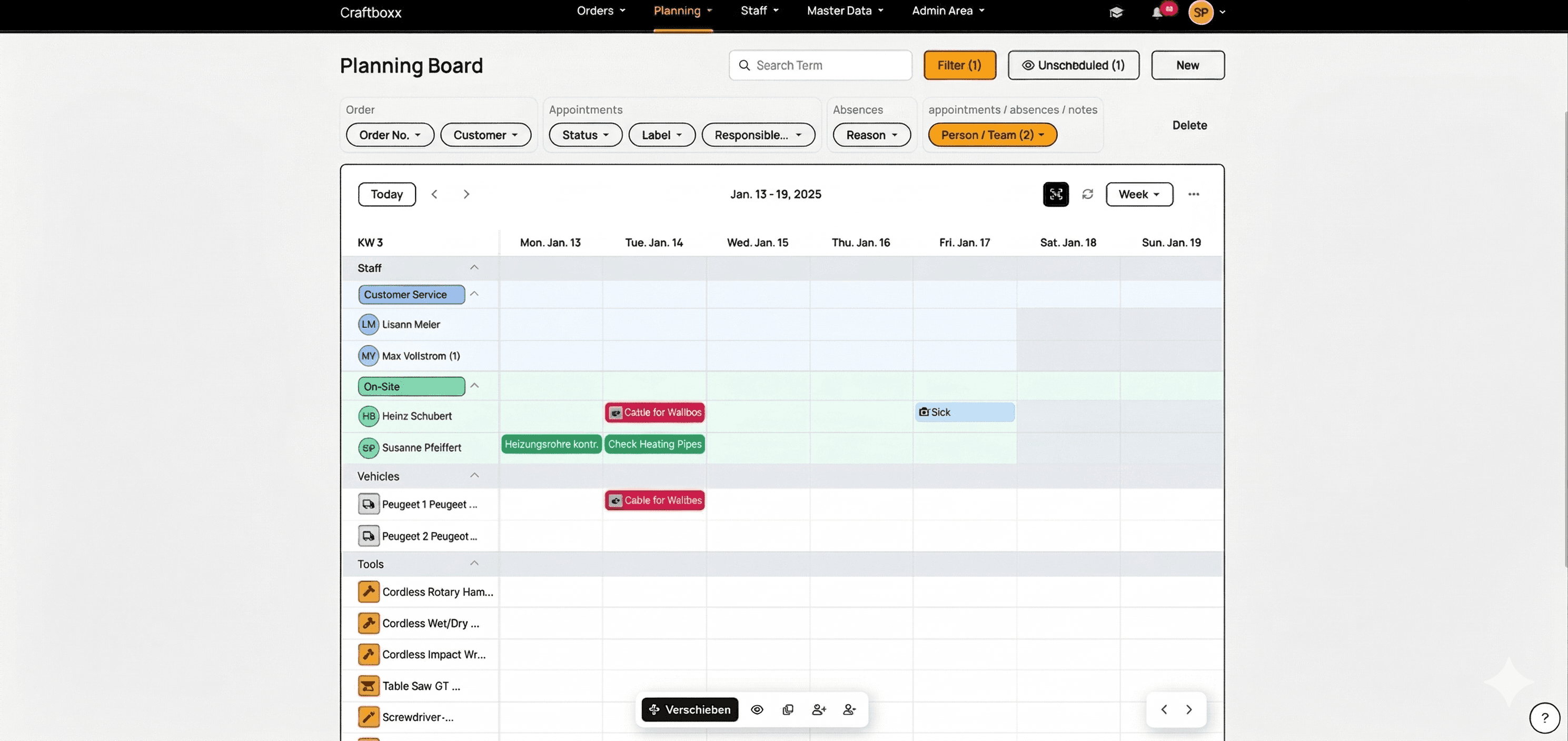
Craftboxx is the right tool to plan your appointments digitally. Use our digital schedule board to plan all your jobs and keep things organized.
Our team planning lets you track work hours and time off just as easily as scheduling conflicts. Thanks to integrated time tracking and work reports, you're always on the safe side.
These customers trust us











Digital scheduling for the trades
Assign resources and plan your crew
As soon as you start Craftboxx, you can create full schedules with just a few clicks. Assign jobs and appointments to your crew. Get notified immediately if there's a conflict and get a better view of everyone's daily workload.
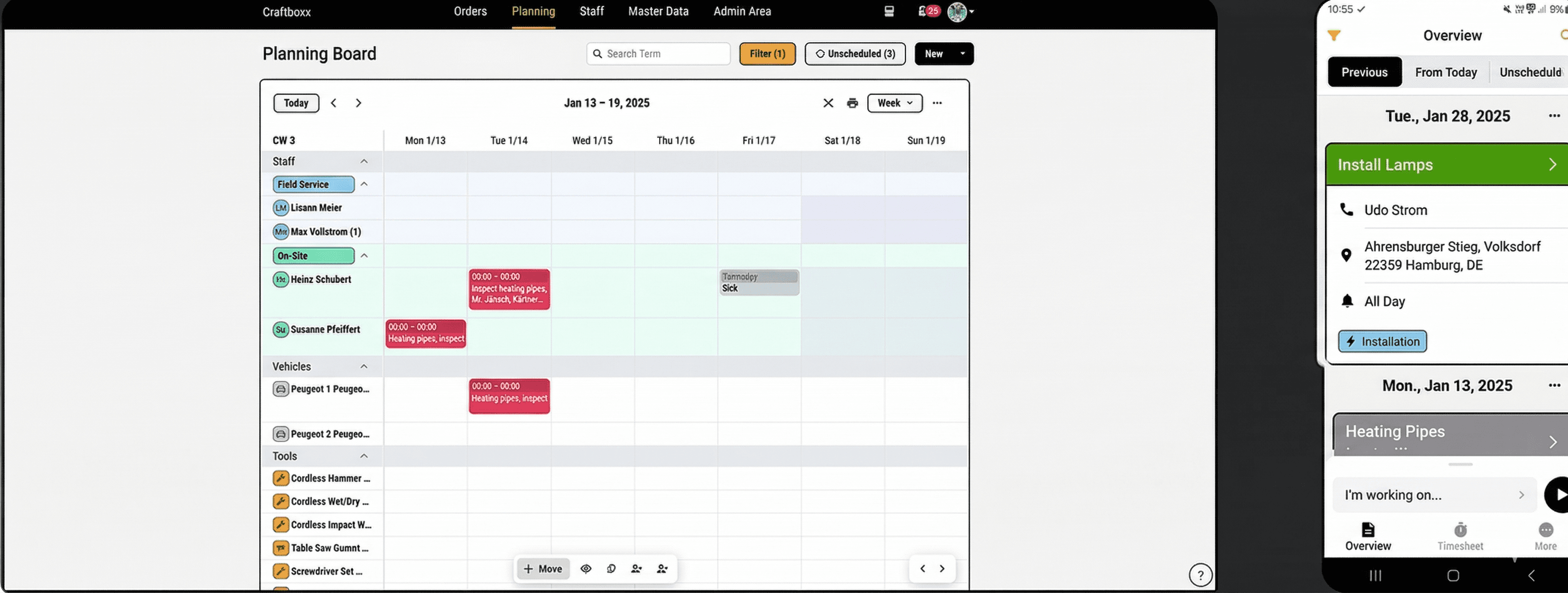
Job planning in one place
Plan your jobs and appointments whenever you need. Jobs can have multiple appointments, so you'll always have every task in a project ready to go. Includes customer data like addresses, contacts, and important notes or docs.
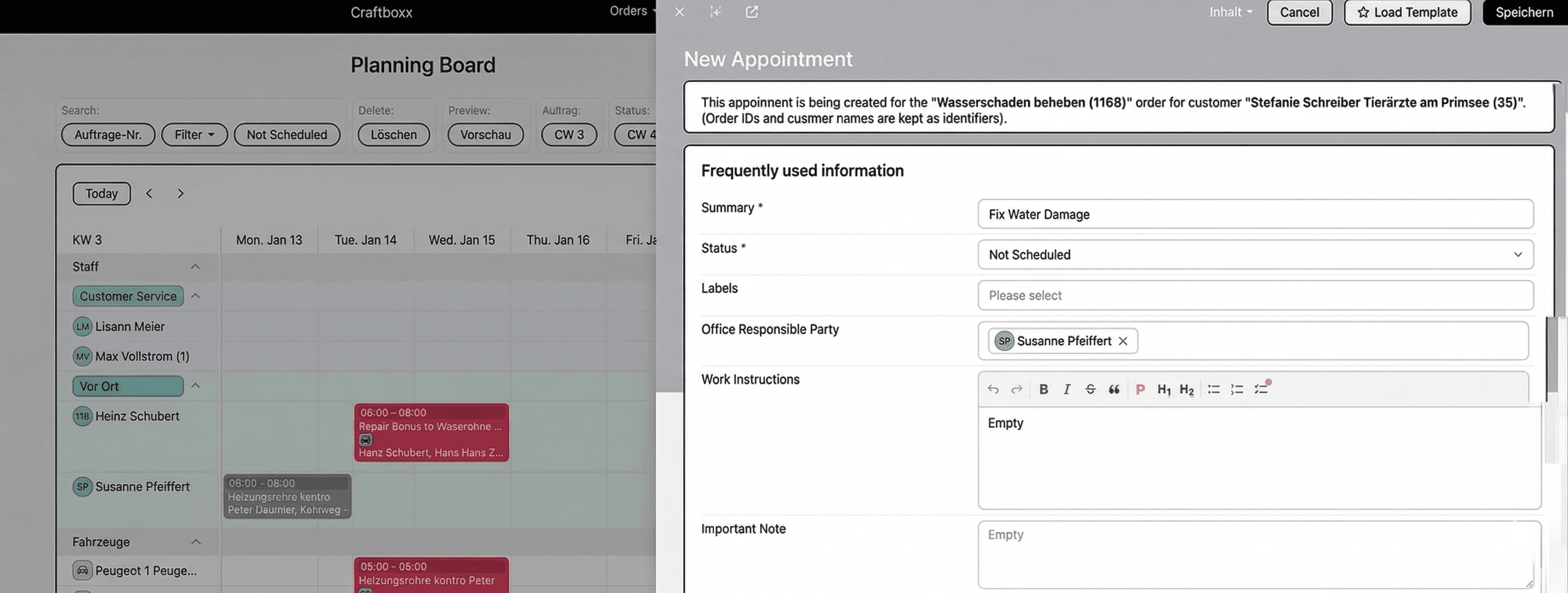
Easy vehicle management
Which trucks are in use and which van is free? Our easy vehicle management shows you exactly what's going on with your fleet. Along with usage, you can get alerts for upcoming maintenance and add extra info.
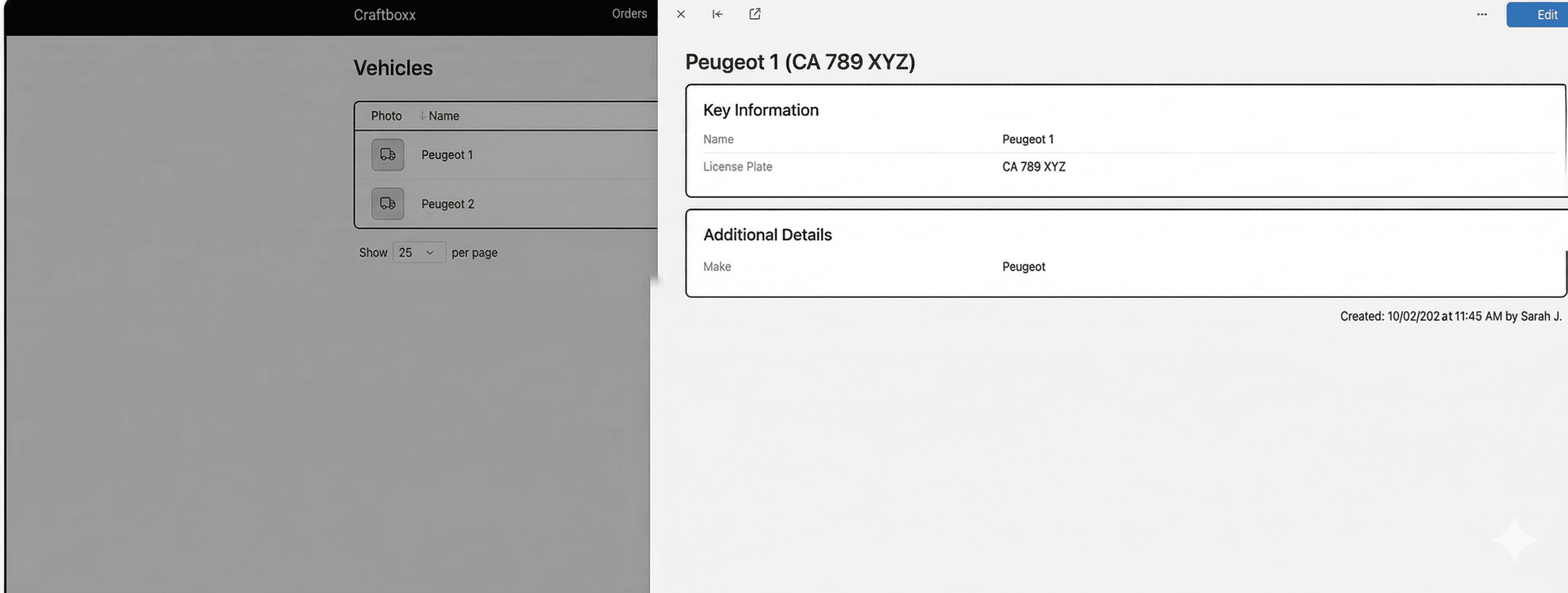
Map view for better routes
We put all your appointments on a clear, integrated map. This gives you a great overview so you can plan nearby jobs better.
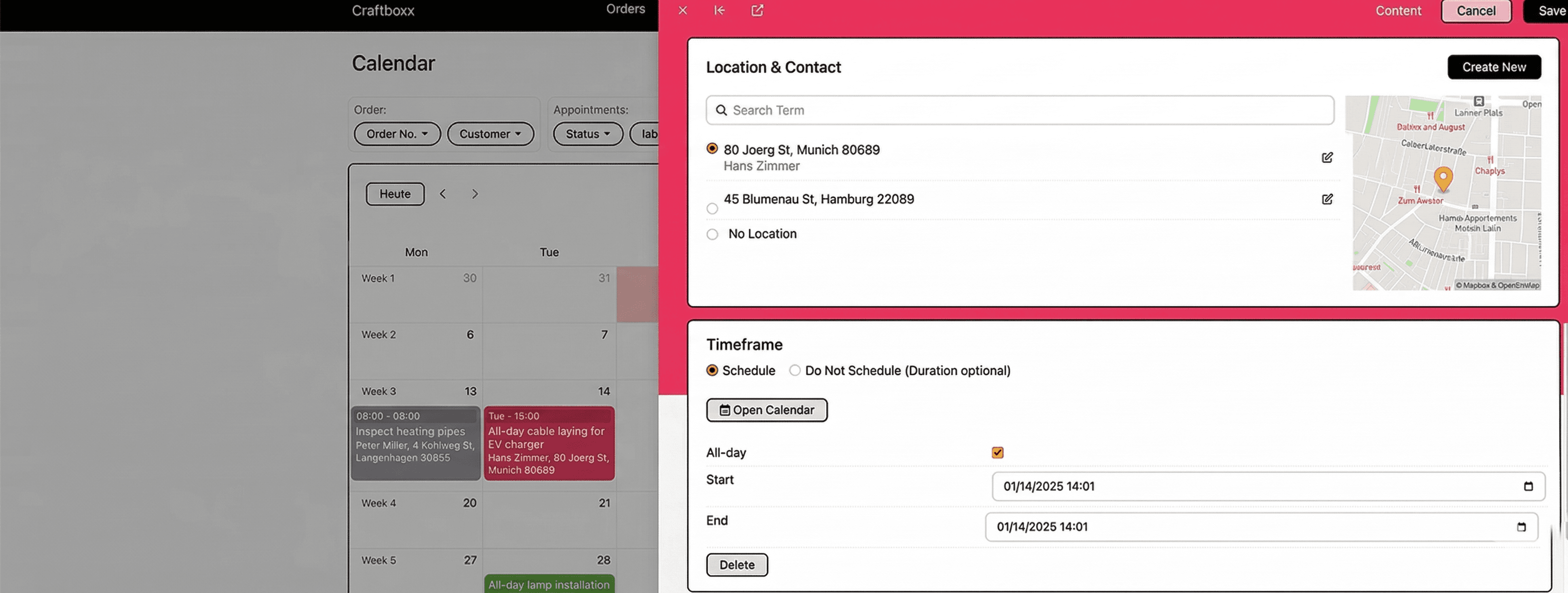
Important alerts right in front of you
You'll get automatic alerts as soon as a new appointment is created or if an existing one changes. That way, nothing slips through the cracks. An extra change log gives you more info. Thanks to Craftboxx, everyone in the shop can follow every job detail.
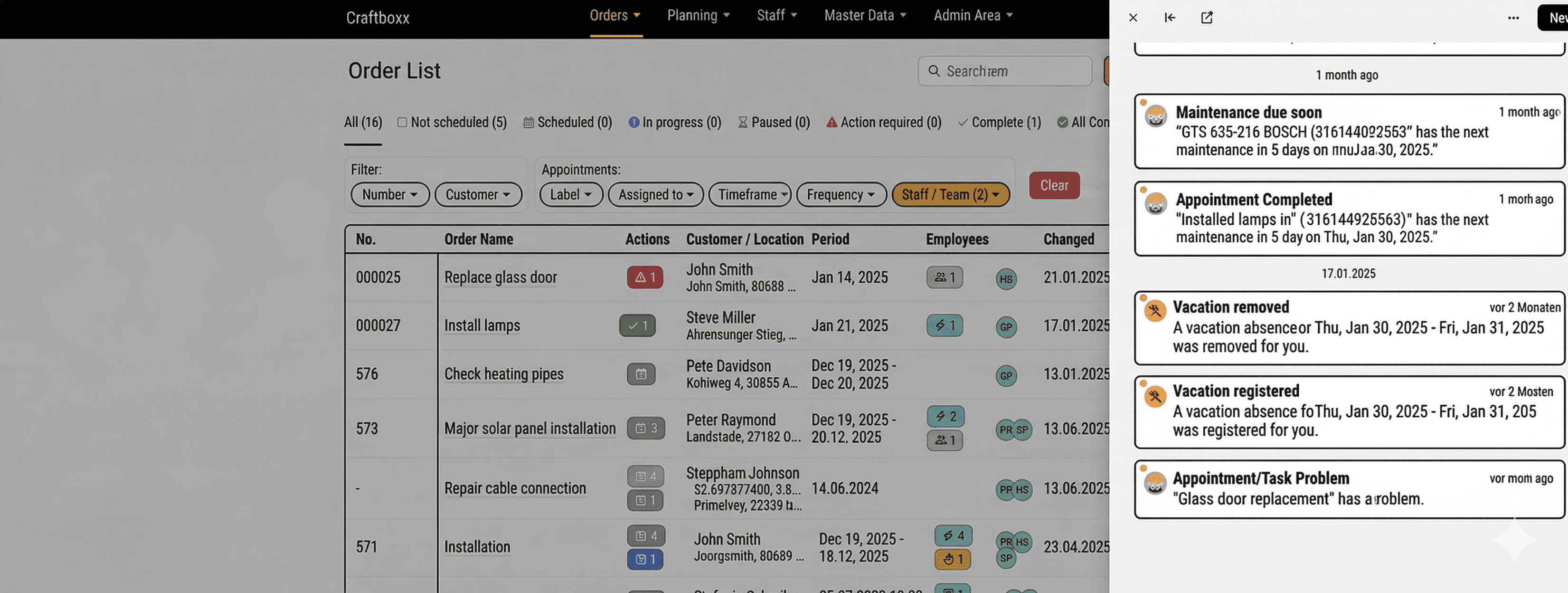
Your trade with Craftboxx

Management
Track every job completely
Digital time tracking included
One tool for all locations
Finally, digital planning
Management
Track every job completely
Digital time tracking included
One tool for all locations
Finally, digital planning

In the office
Organize upcoming work better
Plan and document jobs
Manage time off more easily
Move your business forward digitally
Happier customers
In the office
Organize upcoming work better
Plan and document jobs
Manage time off more easily
Move your business forward digitally
Happier customers

On the job site
Easy documentation and sign-off on-site
Track work hours and time off
Well-planned work at last
On the job site
Easy documentation and sign-off on-site
Track work hours and time off
Well-planned work at last
How do customers like Craftboxx?
PF
Patrick Fialkowski
"A very attractive and user-friendly program for our employees, especially for the planners in the office. Clear order planning and much more. Excellent customer service."
SH
Sascha Hotz
"Perfect for owners of small craft businesses. Craftboxx makes our scheduling, organization, and documentation much easier. Everything is presented in a really simple and self-explanatory way. The pricing is absolutely fair."
RD
Robert Dörmer
"The response has been excellent. We have included Craftboxx in our digital package for tradespeople. The response has been excellent, and communication is absolutely outstanding. I can highly recommend Craftboxx!"
ZU
ZickZack UG&CoKG
"We are very satisfied and can only recommend this tool. We are very satisfied and have been using the tool for six months now. We plan all orders and document them with the corresponding customer signature. What's particularly great is that the app is intuitive to use. Any questions we had were answered immediately. We look forward to continuing this uncomplicated collaboration."
SKG
Firma SKG
We use the app in our 11-person company. As an assembly company, it's a great thing because the transmission works down to the minute. The app is clear, easy to use, and very functional. With planner access, new orders can be added or discussed on the phone at any time. The log can then be created once for the file and once for the customer. The best thing is the young company in the back office. They are willing to accept practical advice from the "front line" and are committed to further development and responding to the needs of practitioners. We are very satisfied and have already recommended the app several times." *** Translated with www.DeepL.com/Translator (free version) ***
SKR
SKR Fahrbahnmarkierung
Craftboxx is a wonderful tool for construction site planning. In addition to vehicles, employees, and tools, materials and material consumption can also be organized very easily. The support is also SUPER. If something needs to be done or a change makes sense, it is implemented quickly!
MP
Marco Papenberg
"We are completely satisfied with this app! We have been planning and implementing our activities with Craftboxx for about a year now. There is nothing to complain about. Thanks to this digital planning and evaluation, we have been able to save on a full-time employee. Kudos to the developers!"
SA
Schuster Aufzugsdienste
"Super useful program. Top-notch support and quick help at any time. Very efficient when it comes to organizing staff and appointments. Very easy to use and super simple and clear for employees and planners."
JS
Jeremia
SevenCable GmbHCraftboxx exceeded our expectations. We spent a long time searching for the right software to make work easier for our field and office staff. Craftboxx has even exceeded our expectations in this regard. From the planning and execution of projects and orders to their documentation and archiving, we believe this program is unbeatable. Craftboxx is designed to be extremely user-friendly thanks to its intuitive structure, and the introduction and integration of the system into our existing business went smoothly and without many questions from staff." *** Translated with www.DeepL.com/Translator (free version) ***
PF
Patrick Fialkowski
"A very attractive and user-friendly program for our employees, especially for the planners in the office. Clear order planning and much more. Excellent customer service."
SH
Sascha Hotz
"Perfect for owners of small craft businesses. Craftboxx makes our scheduling, organization, and documentation much easier. Everything is presented in a really simple and self-explanatory way. The pricing is absolutely fair."
RD
Robert Dörmer
"The response has been excellent. We have included Craftboxx in our digital package for tradespeople. The response has been excellent, and communication is absolutely outstanding. I can highly recommend Craftboxx!"
ZU
ZickZack UG&CoKG
"We are very satisfied and can only recommend this tool. We are very satisfied and have been using the tool for six months now. We plan all orders and document them with the corresponding customer signature. What's particularly great is that the app is intuitive to use. Any questions we had were answered immediately. We look forward to continuing this uncomplicated collaboration."
SKG
Firma SKG
We use the app in our 11-person company. As an assembly company, it's a great thing because the transmission works down to the minute. The app is clear, easy to use, and very functional. With planner access, new orders can be added or discussed on the phone at any time. The log can then be created once for the file and once for the customer. The best thing is the young company in the back office. They are willing to accept practical advice from the "front line" and are committed to further development and responding to the needs of practitioners. We are very satisfied and have already recommended the app several times." *** Translated with www.DeepL.com/Translator (free version) ***
SKR
SKR Fahrbahnmarkierung
Craftboxx is a wonderful tool for construction site planning. In addition to vehicles, employees, and tools, materials and material consumption can also be organized very easily. The support is also SUPER. If something needs to be done or a change makes sense, it is implemented quickly!
MP
Marco Papenberg
"We are completely satisfied with this app! We have been planning and implementing our activities with Craftboxx for about a year now. There is nothing to complain about. Thanks to this digital planning and evaluation, we have been able to save on a full-time employee. Kudos to the developers!"
SA
Schuster Aufzugsdienste
"Super useful program. Top-notch support and quick help at any time. Very efficient when it comes to organizing staff and appointments. Very easy to use and super simple and clear for employees and planners."
JS
Jeremia
SevenCable GmbHCraftboxx exceeded our expectations. We spent a long time searching for the right software to make work easier for our field and office staff. Craftboxx has even exceeded our expectations in this regard. From the planning and execution of projects and orders to their documentation and archiving, we believe this program is unbeatable. Craftboxx is designed to be extremely user-friendly thanks to its intuitive structure, and the introduction and integration of the system into our existing business went smoothly and without many questions from staff." *** Translated with www.DeepL.com/Translator (free version) ***
PF
Patrick Fialkowski
"A very attractive and user-friendly program for our employees, especially for the planners in the office. Clear order planning and much more. Excellent customer service."
SH
Sascha Hotz
"Perfect for owners of small craft businesses. Craftboxx makes our scheduling, organization, and documentation much easier. Everything is presented in a really simple and self-explanatory way. The pricing is absolutely fair."
RD
Robert Dörmer
"The response has been excellent. We have included Craftboxx in our digital package for tradespeople. The response has been excellent, and communication is absolutely outstanding. I can highly recommend Craftboxx!"
ZU
ZickZack UG&CoKG
"We are very satisfied and can only recommend this tool. We are very satisfied and have been using the tool for six months now. We plan all orders and document them with the corresponding customer signature. What's particularly great is that the app is intuitive to use. Any questions we had were answered immediately. We look forward to continuing this uncomplicated collaboration."
SKG
Firma SKG
We use the app in our 11-person company. As an assembly company, it's a great thing because the transmission works down to the minute. The app is clear, easy to use, and very functional. With planner access, new orders can be added or discussed on the phone at any time. The log can then be created once for the file and once for the customer. The best thing is the young company in the back office. They are willing to accept practical advice from the "front line" and are committed to further development and responding to the needs of practitioners. We are very satisfied and have already recommended the app several times." *** Translated with www.DeepL.com/Translator (free version) ***
SKR
SKR Fahrbahnmarkierung
Craftboxx is a wonderful tool for construction site planning. In addition to vehicles, employees, and tools, materials and material consumption can also be organized very easily. The support is also SUPER. If something needs to be done or a change makes sense, it is implemented quickly!
MP
Marco Papenberg
"We are completely satisfied with this app! We have been planning and implementing our activities with Craftboxx for about a year now. There is nothing to complain about. Thanks to this digital planning and evaluation, we have been able to save on a full-time employee. Kudos to the developers!"
SA
Schuster Aufzugsdienste
"Super useful program. Top-notch support and quick help at any time. Very efficient when it comes to organizing staff and appointments. Very easy to use and super simple and clear for employees and planners."
JS
Jeremia
SevenCable GmbHCraftboxx exceeded our expectations. We spent a long time searching for the right software to make work easier for our field and office staff. Craftboxx has even exceeded our expectations in this regard. From the planning and execution of projects and orders to their documentation and archiving, we believe this program is unbeatable. Craftboxx is designed to be extremely user-friendly thanks to its intuitive structure, and the introduction and integration of the system into our existing business went smoothly and without many questions from staff." *** Translated with www.DeepL.com/Translator (free version) ***
PF
Patrick Fialkowski
"A very attractive and user-friendly program for our employees, especially for the planners in the office. Clear order planning and much more. Excellent customer service."
SH
Sascha Hotz
"Perfect for owners of small craft businesses. Craftboxx makes our scheduling, organization, and documentation much easier. Everything is presented in a really simple and self-explanatory way. The pricing is absolutely fair."
RD
Robert Dörmer
"The response has been excellent. We have included Craftboxx in our digital package for tradespeople. The response has been excellent, and communication is absolutely outstanding. I can highly recommend Craftboxx!"
ZU
ZickZack UG&CoKG
"We are very satisfied and can only recommend this tool. We are very satisfied and have been using the tool for six months now. We plan all orders and document them with the corresponding customer signature. What's particularly great is that the app is intuitive to use. Any questions we had were answered immediately. We look forward to continuing this uncomplicated collaboration."
SKG
Firma SKG
We use the app in our 11-person company. As an assembly company, it's a great thing because the transmission works down to the minute. The app is clear, easy to use, and very functional. With planner access, new orders can be added or discussed on the phone at any time. The log can then be created once for the file and once for the customer. The best thing is the young company in the back office. They are willing to accept practical advice from the "front line" and are committed to further development and responding to the needs of practitioners. We are very satisfied and have already recommended the app several times." *** Translated with www.DeepL.com/Translator (free version) ***
SKR
SKR Fahrbahnmarkierung
Craftboxx is a wonderful tool for construction site planning. In addition to vehicles, employees, and tools, materials and material consumption can also be organized very easily. The support is also SUPER. If something needs to be done or a change makes sense, it is implemented quickly!
MP
Marco Papenberg
"We are completely satisfied with this app! We have been planning and implementing our activities with Craftboxx for about a year now. There is nothing to complain about. Thanks to this digital planning and evaluation, we have been able to save on a full-time employee. Kudos to the developers!"
SA
Schuster Aufzugsdienste
"Super useful program. Top-notch support and quick help at any time. Very efficient when it comes to organizing staff and appointments. Very easy to use and super simple and clear for employees and planners."
JS
Jeremia
SevenCable GmbHCraftboxx exceeded our expectations. We spent a long time searching for the right software to make work easier for our field and office staff. Craftboxx has even exceeded our expectations in this regard. From the planning and execution of projects and orders to their documentation and archiving, we believe this program is unbeatable. Craftboxx is designed to be extremely user-friendly thanks to its intuitive structure, and the introduction and integration of the system into our existing business went smoothly and without many questions from staff." *** Translated with www.DeepL.com/Translator (free version) ***
PF
Patrick Fialkowski
"A very attractive and user-friendly program for our employees, especially for the planners in the office. Clear order planning and much more. Excellent customer service."
SH
Sascha Hotz
"Perfect for owners of small craft businesses. Craftboxx makes our scheduling, organization, and documentation much easier. Everything is presented in a really simple and self-explanatory way. The pricing is absolutely fair."
RD
Robert Dörmer
"The response has been excellent. We have included Craftboxx in our digital package for tradespeople. The response has been excellent, and communication is absolutely outstanding. I can highly recommend Craftboxx!"
ZU
ZickZack UG&CoKG
"We are very satisfied and can only recommend this tool. We are very satisfied and have been using the tool for six months now. We plan all orders and document them with the corresponding customer signature. What's particularly great is that the app is intuitive to use. Any questions we had were answered immediately. We look forward to continuing this uncomplicated collaboration."
SKG
Firma SKG
We use the app in our 11-person company. As an assembly company, it's a great thing because the transmission works down to the minute. The app is clear, easy to use, and very functional. With planner access, new orders can be added or discussed on the phone at any time. The log can then be created once for the file and once for the customer. The best thing is the young company in the back office. They are willing to accept practical advice from the "front line" and are committed to further development and responding to the needs of practitioners. We are very satisfied and have already recommended the app several times." *** Translated with www.DeepL.com/Translator (free version) ***
SKR
SKR Fahrbahnmarkierung
Craftboxx is a wonderful tool for construction site planning. In addition to vehicles, employees, and tools, materials and material consumption can also be organized very easily. The support is also SUPER. If something needs to be done or a change makes sense, it is implemented quickly!
MP
Marco Papenberg
"We are completely satisfied with this app! We have been planning and implementing our activities with Craftboxx for about a year now. There is nothing to complain about. Thanks to this digital planning and evaluation, we have been able to save on a full-time employee. Kudos to the developers!"
SA
Schuster Aufzugsdienste
"Super useful program. Top-notch support and quick help at any time. Very efficient when it comes to organizing staff and appointments. Very easy to use and super simple and clear for employees and planners."
JS
Jeremia
SevenCable GmbHCraftboxx exceeded our expectations. We spent a long time searching for the right software to make work easier for our field and office staff. Craftboxx has even exceeded our expectations in this regard. From the planning and execution of projects and orders to their documentation and archiving, we believe this program is unbeatable. Craftboxx is designed to be extremely user-friendly thanks to its intuitive structure, and the introduction and integration of the system into our existing business went smoothly and without many questions from staff." *** Translated with www.DeepL.com/Translator (free version) ***
PF
Patrick Fialkowski
"A very attractive and user-friendly program for our employees, especially for the planners in the office. Clear order planning and much more. Excellent customer service."
SH
Sascha Hotz
"Perfect for owners of small craft businesses. Craftboxx makes our scheduling, organization, and documentation much easier. Everything is presented in a really simple and self-explanatory way. The pricing is absolutely fair."
RD
Robert Dörmer
"The response has been excellent. We have included Craftboxx in our digital package for tradespeople. The response has been excellent, and communication is absolutely outstanding. I can highly recommend Craftboxx!"
ZU
ZickZack UG&CoKG
"We are very satisfied and can only recommend this tool. We are very satisfied and have been using the tool for six months now. We plan all orders and document them with the corresponding customer signature. What's particularly great is that the app is intuitive to use. Any questions we had were answered immediately. We look forward to continuing this uncomplicated collaboration."
SKG
Firma SKG
We use the app in our 11-person company. As an assembly company, it's a great thing because the transmission works down to the minute. The app is clear, easy to use, and very functional. With planner access, new orders can be added or discussed on the phone at any time. The log can then be created once for the file and once for the customer. The best thing is the young company in the back office. They are willing to accept practical advice from the "front line" and are committed to further development and responding to the needs of practitioners. We are very satisfied and have already recommended the app several times." *** Translated with www.DeepL.com/Translator (free version) ***
SKR
SKR Fahrbahnmarkierung
Craftboxx is a wonderful tool for construction site planning. In addition to vehicles, employees, and tools, materials and material consumption can also be organized very easily. The support is also SUPER. If something needs to be done or a change makes sense, it is implemented quickly!
MP
Marco Papenberg
"We are completely satisfied with this app! We have been planning and implementing our activities with Craftboxx for about a year now. There is nothing to complain about. Thanks to this digital planning and evaluation, we have been able to save on a full-time employee. Kudos to the developers!"
SA
Schuster Aufzugsdienste
"Super useful program. Top-notch support and quick help at any time. Very efficient when it comes to organizing staff and appointments. Very easy to use and super simple and clear for employees and planners."
JS
Jeremia
SevenCable GmbHCraftboxx exceeded our expectations. We spent a long time searching for the right software to make work easier for our field and office staff. Craftboxx has even exceeded our expectations in this regard. From the planning and execution of projects and orders to their documentation and archiving, we believe this program is unbeatable. Craftboxx is designed to be extremely user-friendly thanks to its intuitive structure, and the introduction and integration of the system into our existing business went smoothly and without many questions from staff." *** Translated with www.DeepL.com/Translator (free version) ***
PF
Patrick Fialkowski
"A very attractive and user-friendly program for our employees, especially for the planners in the office. Clear order planning and much more. Excellent customer service."
SH
Sascha Hotz
"Perfect for owners of small craft businesses. Craftboxx makes our scheduling, organization, and documentation much easier. Everything is presented in a really simple and self-explanatory way. The pricing is absolutely fair."
RD
Robert Dörmer
"The response has been excellent. We have included Craftboxx in our digital package for tradespeople. The response has been excellent, and communication is absolutely outstanding. I can highly recommend Craftboxx!"
ZU
ZickZack UG&CoKG
"We are very satisfied and can only recommend this tool. We are very satisfied and have been using the tool for six months now. We plan all orders and document them with the corresponding customer signature. What's particularly great is that the app is intuitive to use. Any questions we had were answered immediately. We look forward to continuing this uncomplicated collaboration."
SKG
Firma SKG
We use the app in our 11-person company. As an assembly company, it's a great thing because the transmission works down to the minute. The app is clear, easy to use, and very functional. With planner access, new orders can be added or discussed on the phone at any time. The log can then be created once for the file and once for the customer. The best thing is the young company in the back office. They are willing to accept practical advice from the "front line" and are committed to further development and responding to the needs of practitioners. We are very satisfied and have already recommended the app several times." *** Translated with www.DeepL.com/Translator (free version) ***
SKR
SKR Fahrbahnmarkierung
Craftboxx is a wonderful tool for construction site planning. In addition to vehicles, employees, and tools, materials and material consumption can also be organized very easily. The support is also SUPER. If something needs to be done or a change makes sense, it is implemented quickly!
MP
Marco Papenberg
"We are completely satisfied with this app! We have been planning and implementing our activities with Craftboxx for about a year now. There is nothing to complain about. Thanks to this digital planning and evaluation, we have been able to save on a full-time employee. Kudos to the developers!"
SA
Schuster Aufzugsdienste
"Super useful program. Top-notch support and quick help at any time. Very efficient when it comes to organizing staff and appointments. Very easy to use and super simple and clear for employees and planners."
JS
Jeremia
SevenCable GmbHCraftboxx exceeded our expectations. We spent a long time searching for the right software to make work easier for our field and office staff. Craftboxx has even exceeded our expectations in this regard. From the planning and execution of projects and orders to their documentation and archiving, we believe this program is unbeatable. Craftboxx is designed to be extremely user-friendly thanks to its intuitive structure, and the introduction and integration of the system into our existing business went smoothly and without many questions from staff." *** Translated with www.DeepL.com/Translator (free version) ***
PF
Patrick Fialkowski
"A very attractive and user-friendly program for our employees, especially for the planners in the office. Clear order planning and much more. Excellent customer service."
SH
Sascha Hotz
"Perfect for owners of small craft businesses. Craftboxx makes our scheduling, organization, and documentation much easier. Everything is presented in a really simple and self-explanatory way. The pricing is absolutely fair."
RD
Robert Dörmer
"The response has been excellent. We have included Craftboxx in our digital package for tradespeople. The response has been excellent, and communication is absolutely outstanding. I can highly recommend Craftboxx!"
ZU
ZickZack UG&CoKG
"We are very satisfied and can only recommend this tool. We are very satisfied and have been using the tool for six months now. We plan all orders and document them with the corresponding customer signature. What's particularly great is that the app is intuitive to use. Any questions we had were answered immediately. We look forward to continuing this uncomplicated collaboration."
SKG
Firma SKG
We use the app in our 11-person company. As an assembly company, it's a great thing because the transmission works down to the minute. The app is clear, easy to use, and very functional. With planner access, new orders can be added or discussed on the phone at any time. The log can then be created once for the file and once for the customer. The best thing is the young company in the back office. They are willing to accept practical advice from the "front line" and are committed to further development and responding to the needs of practitioners. We are very satisfied and have already recommended the app several times." *** Translated with www.DeepL.com/Translator (free version) ***
SKR
SKR Fahrbahnmarkierung
Craftboxx is a wonderful tool for construction site planning. In addition to vehicles, employees, and tools, materials and material consumption can also be organized very easily. The support is also SUPER. If something needs to be done or a change makes sense, it is implemented quickly!
MP
Marco Papenberg
"We are completely satisfied with this app! We have been planning and implementing our activities with Craftboxx for about a year now. There is nothing to complain about. Thanks to this digital planning and evaluation, we have been able to save on a full-time employee. Kudos to the developers!"
SA
Schuster Aufzugsdienste
"Super useful program. Top-notch support and quick help at any time. Very efficient when it comes to organizing staff and appointments. Very easy to use and super simple and clear for employees and planners."
JS
Jeremia
SevenCable GmbHCraftboxx exceeded our expectations. We spent a long time searching for the right software to make work easier for our field and office staff. Craftboxx has even exceeded our expectations in this regard. From the planning and execution of projects and orders to their documentation and archiving, we believe this program is unbeatable. Craftboxx is designed to be extremely user-friendly thanks to its intuitive structure, and the introduction and integration of the system into our existing business went smoothly and without many questions from staff." *** Translated with www.DeepL.com/Translator (free version) ***
PF
Patrick Fialkowski
"A very attractive and user-friendly program for our employees, especially for the planners in the office. Clear order planning and much more. Excellent customer service."
SH
Sascha Hotz
"Perfect for owners of small craft businesses. Craftboxx makes our scheduling, organization, and documentation much easier. Everything is presented in a really simple and self-explanatory way. The pricing is absolutely fair."
RD
Robert Dörmer
"The response has been excellent. We have included Craftboxx in our digital package for tradespeople. The response has been excellent, and communication is absolutely outstanding. I can highly recommend Craftboxx!"
ZU
ZickZack UG&CoKG
"We are very satisfied and can only recommend this tool. We are very satisfied and have been using the tool for six months now. We plan all orders and document them with the corresponding customer signature. What's particularly great is that the app is intuitive to use. Any questions we had were answered immediately. We look forward to continuing this uncomplicated collaboration."
SKG
Firma SKG
We use the app in our 11-person company. As an assembly company, it's a great thing because the transmission works down to the minute. The app is clear, easy to use, and very functional. With planner access, new orders can be added or discussed on the phone at any time. The log can then be created once for the file and once for the customer. The best thing is the young company in the back office. They are willing to accept practical advice from the "front line" and are committed to further development and responding to the needs of practitioners. We are very satisfied and have already recommended the app several times." *** Translated with www.DeepL.com/Translator (free version) ***
SKR
SKR Fahrbahnmarkierung
Craftboxx is a wonderful tool for construction site planning. In addition to vehicles, employees, and tools, materials and material consumption can also be organized very easily. The support is also SUPER. If something needs to be done or a change makes sense, it is implemented quickly!
MP
Marco Papenberg
"We are completely satisfied with this app! We have been planning and implementing our activities with Craftboxx for about a year now. There is nothing to complain about. Thanks to this digital planning and evaluation, we have been able to save on a full-time employee. Kudos to the developers!"
SA
Schuster Aufzugsdienste
"Super useful program. Top-notch support and quick help at any time. Very efficient when it comes to organizing staff and appointments. Very easy to use and super simple and clear for employees and planners."
JS
Jeremia
SevenCable GmbHCraftboxx exceeded our expectations. We spent a long time searching for the right software to make work easier for our field and office staff. Craftboxx has even exceeded our expectations in this regard. From the planning and execution of projects and orders to their documentation and archiving, we believe this program is unbeatable. Craftboxx is designed to be extremely user-friendly thanks to its intuitive structure, and the introduction and integration of the system into our existing business went smoothly and without many questions from staff." *** Translated with www.DeepL.com/Translator (free version) ***
PF
Patrick Fialkowski
"A very attractive and user-friendly program for our employees, especially for the planners in the office. Clear order planning and much more. Excellent customer service."
SH
Sascha Hotz
"Perfect for owners of small craft businesses. Craftboxx makes our scheduling, organization, and documentation much easier. Everything is presented in a really simple and self-explanatory way. The pricing is absolutely fair."
RD
Robert Dörmer
"The response has been excellent. We have included Craftboxx in our digital package for tradespeople. The response has been excellent, and communication is absolutely outstanding. I can highly recommend Craftboxx!"
ZU
ZickZack UG&CoKG
"We are very satisfied and can only recommend this tool. We are very satisfied and have been using the tool for six months now. We plan all orders and document them with the corresponding customer signature. What's particularly great is that the app is intuitive to use. Any questions we had were answered immediately. We look forward to continuing this uncomplicated collaboration."
SKG
Firma SKG
We use the app in our 11-person company. As an assembly company, it's a great thing because the transmission works down to the minute. The app is clear, easy to use, and very functional. With planner access, new orders can be added or discussed on the phone at any time. The log can then be created once for the file and once for the customer. The best thing is the young company in the back office. They are willing to accept practical advice from the "front line" and are committed to further development and responding to the needs of practitioners. We are very satisfied and have already recommended the app several times." *** Translated with www.DeepL.com/Translator (free version) ***
SKR
SKR Fahrbahnmarkierung
Craftboxx is a wonderful tool for construction site planning. In addition to vehicles, employees, and tools, materials and material consumption can also be organized very easily. The support is also SUPER. If something needs to be done or a change makes sense, it is implemented quickly!
MP
Marco Papenberg
"We are completely satisfied with this app! We have been planning and implementing our activities with Craftboxx for about a year now. There is nothing to complain about. Thanks to this digital planning and evaluation, we have been able to save on a full-time employee. Kudos to the developers!"
SA
Schuster Aufzugsdienste
"Super useful program. Top-notch support and quick help at any time. Very efficient when it comes to organizing staff and appointments. Very easy to use and super simple and clear for employees and planners."
JS
Jeremia
SevenCable GmbHCraftboxx exceeded our expectations. We spent a long time searching for the right software to make work easier for our field and office staff. Craftboxx has even exceeded our expectations in this regard. From the planning and execution of projects and orders to their documentation and archiving, we believe this program is unbeatable. Craftboxx is designed to be extremely user-friendly thanks to its intuitive structure, and the introduction and integration of the system into our existing business went smoothly and without many questions from staff." *** Translated with www.DeepL.com/Translator (free version) ***
PF
Patrick Fialkowski
"A very attractive and user-friendly program for our employees, especially for the planners in the office. Clear order planning and much more. Excellent customer service."
SH
Sascha Hotz
"Perfect for owners of small craft businesses. Craftboxx makes our scheduling, organization, and documentation much easier. Everything is presented in a really simple and self-explanatory way. The pricing is absolutely fair."
RD
Robert Dörmer
"The response has been excellent. We have included Craftboxx in our digital package for tradespeople. The response has been excellent, and communication is absolutely outstanding. I can highly recommend Craftboxx!"
ZU
ZickZack UG&CoKG
"We are very satisfied and can only recommend this tool. We are very satisfied and have been using the tool for six months now. We plan all orders and document them with the corresponding customer signature. What's particularly great is that the app is intuitive to use. Any questions we had were answered immediately. We look forward to continuing this uncomplicated collaboration."
SKG
Firma SKG
We use the app in our 11-person company. As an assembly company, it's a great thing because the transmission works down to the minute. The app is clear, easy to use, and very functional. With planner access, new orders can be added or discussed on the phone at any time. The log can then be created once for the file and once for the customer. The best thing is the young company in the back office. They are willing to accept practical advice from the "front line" and are committed to further development and responding to the needs of practitioners. We are very satisfied and have already recommended the app several times." *** Translated with www.DeepL.com/Translator (free version) ***
SKR
SKR Fahrbahnmarkierung
Craftboxx is a wonderful tool for construction site planning. In addition to vehicles, employees, and tools, materials and material consumption can also be organized very easily. The support is also SUPER. If something needs to be done or a change makes sense, it is implemented quickly!
MP
Marco Papenberg
"We are completely satisfied with this app! We have been planning and implementing our activities with Craftboxx for about a year now. There is nothing to complain about. Thanks to this digital planning and evaluation, we have been able to save on a full-time employee. Kudos to the developers!"
SA
Schuster Aufzugsdienste
"Super useful program. Top-notch support and quick help at any time. Very efficient when it comes to organizing staff and appointments. Very easy to use and super simple and clear for employees and planners."
JS
Jeremia
SevenCable GmbHCraftboxx exceeded our expectations. We spent a long time searching for the right software to make work easier for our field and office staff. Craftboxx has even exceeded our expectations in this regard. From the planning and execution of projects and orders to their documentation and archiving, we believe this program is unbeatable. Craftboxx is designed to be extremely user-friendly thanks to its intuitive structure, and the introduction and integration of the system into our existing business went smoothly and without many questions from staff." *** Translated with www.DeepL.com/Translator (free version) ***
PF
Patrick Fialkowski
"A very attractive and user-friendly program for our employees, especially for the planners in the office. Clear order planning and much more. Excellent customer service."
SH
Sascha Hotz
"Perfect for owners of small craft businesses. Craftboxx makes our scheduling, organization, and documentation much easier. Everything is presented in a really simple and self-explanatory way. The pricing is absolutely fair."
RD
Robert Dörmer
"The response has been excellent. We have included Craftboxx in our digital package for tradespeople. The response has been excellent, and communication is absolutely outstanding. I can highly recommend Craftboxx!"
ZU
ZickZack UG&CoKG
"We are very satisfied and can only recommend this tool. We are very satisfied and have been using the tool for six months now. We plan all orders and document them with the corresponding customer signature. What's particularly great is that the app is intuitive to use. Any questions we had were answered immediately. We look forward to continuing this uncomplicated collaboration."
SKG
Firma SKG
We use the app in our 11-person company. As an assembly company, it's a great thing because the transmission works down to the minute. The app is clear, easy to use, and very functional. With planner access, new orders can be added or discussed on the phone at any time. The log can then be created once for the file and once for the customer. The best thing is the young company in the back office. They are willing to accept practical advice from the "front line" and are committed to further development and responding to the needs of practitioners. We are very satisfied and have already recommended the app several times." *** Translated with www.DeepL.com/Translator (free version) ***
SKR
SKR Fahrbahnmarkierung
Craftboxx is a wonderful tool for construction site planning. In addition to vehicles, employees, and tools, materials and material consumption can also be organized very easily. The support is also SUPER. If something needs to be done or a change makes sense, it is implemented quickly!
MP
Marco Papenberg
"We are completely satisfied with this app! We have been planning and implementing our activities with Craftboxx for about a year now. There is nothing to complain about. Thanks to this digital planning and evaluation, we have been able to save on a full-time employee. Kudos to the developers!"
SA
Schuster Aufzugsdienste
"Super useful program. Top-notch support and quick help at any time. Very efficient when it comes to organizing staff and appointments. Very easy to use and super simple and clear for employees and planners."
JS
Jeremia
SevenCable GmbHCraftboxx exceeded our expectations. We spent a long time searching for the right software to make work easier for our field and office staff. Craftboxx has even exceeded our expectations in this regard. From the planning and execution of projects and orders to their documentation and archiving, we believe this program is unbeatable. Craftboxx is designed to be extremely user-friendly thanks to its intuitive structure, and the introduction and integration of the system into our existing business went smoothly and without many questions from staff." *** Translated with www.DeepL.com/Translator (free version) ***
1
Start trial
2
Set up Craftboxx
3
Try it for 14 days
Craftspeople
Successful jobs
Uploaded docs
Get started for free
Cross "finding a good planning and documentation tool" off your list today.
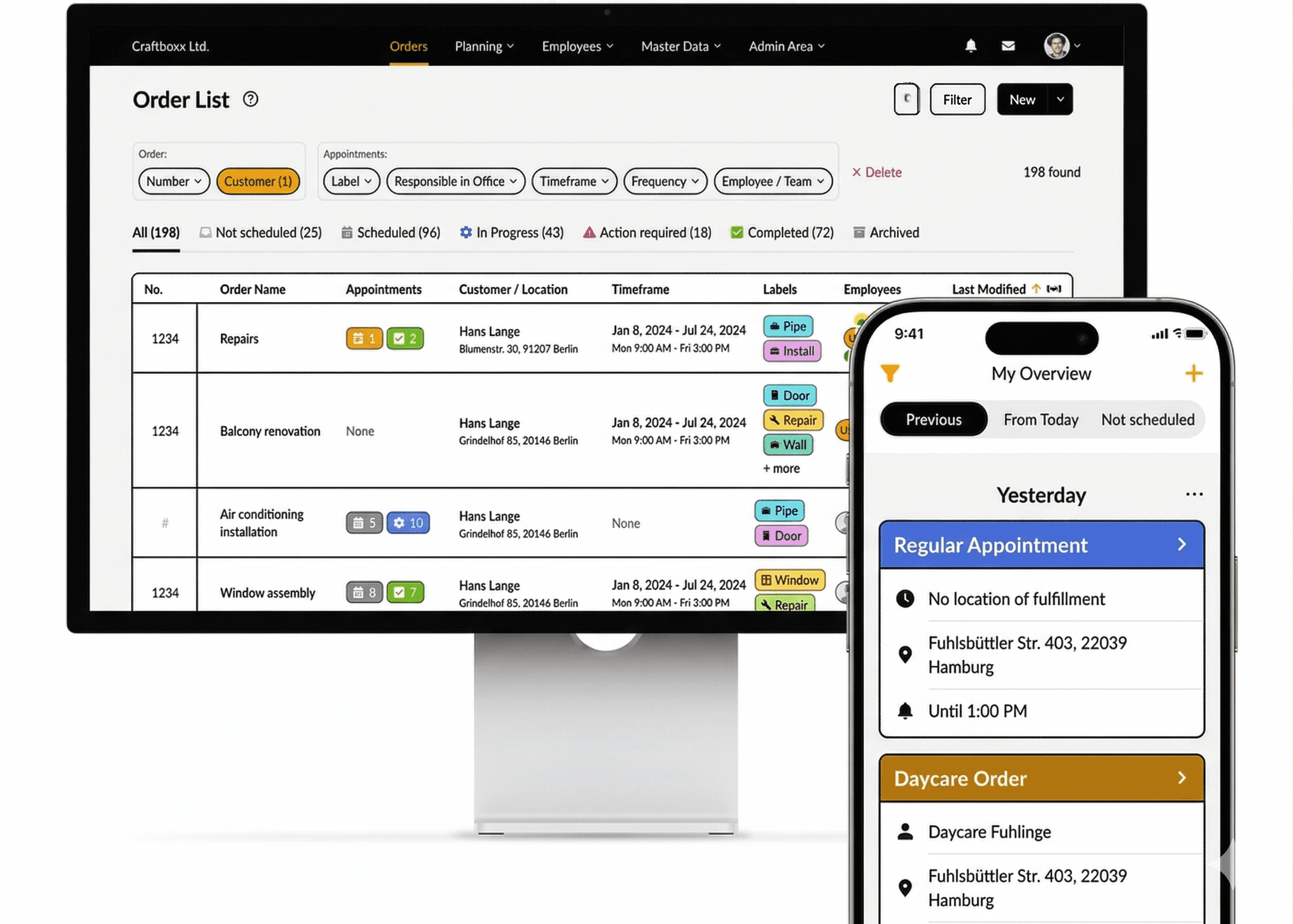
Get started for free
Cross "finding a good planning and documentation tool" off your list today.
Get started for free
Cross "finding a good planning and documentation tool" off your list today.
FAQ
How does Craftboxx help with scheduling?
Craftboxx offers an easy calendar and a schedule board where you can see appointments, resources, and your crew in one place. Just drag and drop to assign and adjust tasks.
Can I schedule multiple resources for one appointment?
Yes, you can add tools, vehicles, and materials to an appointment along with your crew. The system checks availability to avoid double-bookings, so you can be sure you're using all your resources the right way.
Can I include time off in my planning?
Yes, time off like vacations or sick days is color-coded in the calendar and automatically factored into the schedule. This helps you avoid double-bookings or unexpected gaps.
How do I keep track of unscheduled tasks?
Unscheduled tasks show up in a separate view. You can just drag and drop them onto the schedule board to assign and set a time.
What happens if plans change last minute?
Craftboxx lets you adjust plans on the fly. Changes sync instantly, and the crew gets automatic push notifications on their phones.
How does Craftboxx help with scheduling?
Craftboxx offers an easy calendar and a schedule board where you can see appointments, resources, and your crew in one place. Just drag and drop to assign and adjust tasks.
Can I schedule multiple resources for one appointment?
Yes, you can add tools, vehicles, and materials to an appointment along with your crew. The system checks availability to avoid double-bookings, so you can be sure you're using all your resources the right way.
Can I include time off in my planning?
Yes, time off like vacations or sick days is color-coded in the calendar and automatically factored into the schedule. This helps you avoid double-bookings or unexpected gaps.
How do I keep track of unscheduled tasks?
Unscheduled tasks show up in a separate view. You can just drag and drop them onto the schedule board to assign and set a time.
What happens if plans change last minute?
Craftboxx lets you adjust plans on the fly. Changes sync instantly, and the crew gets automatic push notifications on their phones.
How does Craftboxx help with scheduling?
Craftboxx offers an easy calendar and a schedule board where you can see appointments, resources, and your crew in one place. Just drag and drop to assign and adjust tasks.
Can I schedule multiple resources for one appointment?
Yes, you can add tools, vehicles, and materials to an appointment along with your crew. The system checks availability to avoid double-bookings, so you can be sure you're using all your resources the right way.
Can I include time off in my planning?
Yes, time off like vacations or sick days is color-coded in the calendar and automatically factored into the schedule. This helps you avoid double-bookings or unexpected gaps.
How do I keep track of unscheduled tasks?
Unscheduled tasks show up in a separate view. You can just drag and drop them onto the schedule board to assign and set a time.
What happens if plans change last minute?
Craftboxx lets you adjust plans on the fly. Changes sync instantly, and the crew gets automatic push notifications on their phones.